

-1.svg)

-1.svg)
-3.svg)
%201-1.svg)

%202-1.svg)

-1.svg)

%201-1.svg)


%203-1.svg)

%201-1.svg)
-1.svg)

-3.svg)


The Shop template serves as your brand’s primary e-commerce destination, designed for a seamless and intuitive retail experience. By combining a high-impact visual introduction with a dynamic, filterable inventory, this template makes it easy for members to browse and purchase everything from professional gym equipment to nutritional supplements.
Key Modules Used:
-1.webp)
1
Setup
Once your HubSpot account is set up, you can acquire Fitmax theme through HubSpot’s marketplace. This will automatically install the theme in the HubSpot instance or portal you are logged into.
After downloading our theme. In your hubspot account set Fitmax as your active theme. You can clone the theme as a child theme so that you can customize the themes and modules.
After downloading our theme. In your hubspot account set Fitmax as your active theme. You can clone the theme as a child theme so that you can customize the themes and modules.
2
Theme Customization
Theme Settings allow you to apply widespread design changes to your entire website from one central place.
How to Access Global Theme Settings
To get started with customizing Fitmax, follow these steps:
- In your HubSpot account, click the Settings icon (gear) in the main navigation bar.
- In the left sidebar menu, navigate to Content > Themes & Modules > Themes.
- Hover over the Fitmax theme and click Edit theme.
- You will now see the Global Theme Settings panel on the left side of your screen.
Understanding the Theme Settings
The Fitmax theme settings are broken down into seven main groups to make customizing your site a breeze:
- Brand Colors: Set the primary and secondary colors that define your brand identity. These selections will act as the default palette across your site.
- Background Colors: Establish the default background colors used for various sections and page wrappers to ensure a cohesive look.
- Typography: Complete control over your text. Here you can set specific font overrides for headings and body copy, including font families, colors, responsive sizes, and line heights.
- Buttons: Complete settings for your calls-to-action. Customize your button colors, fonts, border radiuses, and hover-state styling.
- General view: Key surface settings and default visual behaviors that dictate the overall layout and structural appearance of your website.
- Spacing: Global controls for the default margins and padding used across your website's sections and containers to maintain consistent breathing room.
- Forms: Global color and styling settings for all form inputs, labels, and submit buttons.
Brand colors
In Brand colors, there are two colors option for primary and secondary colors
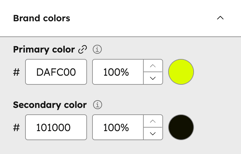
Initially we used #DAFC00 for primary colors and #101000 for secondary colors.
Background colors
We use five different colors and one gradient color for different background colors.
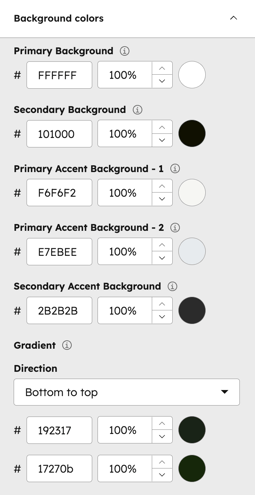
Color codes that we used initially are:
Primary Background ( #FFFFFF)
Secondary Background ( #101000)
Primary Accent Background -1 (#F6F6F2)
Primary Accent Background -2 ( #E7EBEE)
Secondary Accent Background ( #2B2B2B)
Gradient (Bottom to Top #192317 #17270b)
Typography
Fitmax gives you full control of your theme typography. Primary Font, Secondary Font, Text colors, Body, Button and Others.
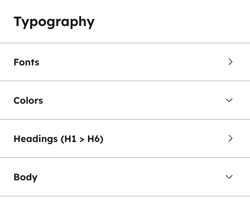
1. Fonts
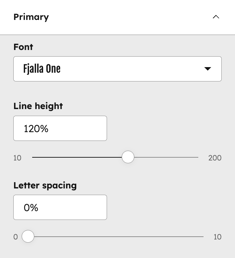
Primary Font :
Here you can control your theme's primary font. We used Fjalla One as the primary font. Mainly, this primary font is used in Title & Header of this theme
Secondary Font :
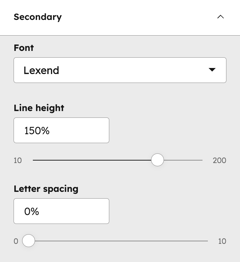
You can customize your theme's secondary font from here. We used Lexend as our secondary font. This font is mainly used in this theme body text like paragraphs, articles and others.
2. Colors
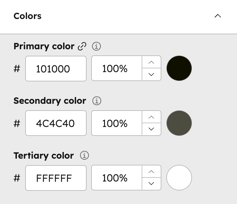
In Colors you will get three text color options.
3. Headings
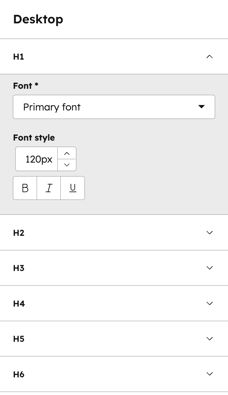
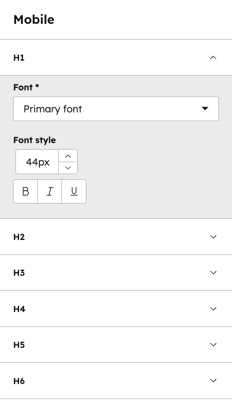
In the Headings you can set different options for the heading types.
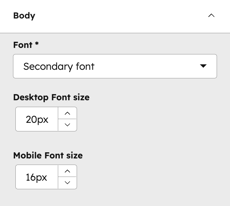
4. Body
We used our secondary font as the body text of the theme. You can also control the body text size from this option.
Buttons
Fitmax features two core button styles that support extensive customization.By utilizing the built-in style controls, you can adjust typography, background gradients, and corner rounding to achieve a bespoke design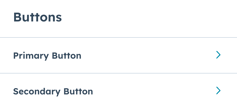
Each button has the following controls: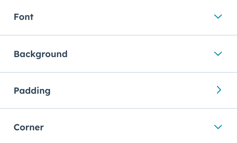
You can customize each button in detail like Colors, Padding, Corner Radius, Hover effect and others.
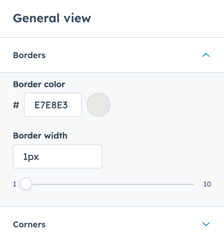
General View
In general view you can adjust the border and corner radius of your theme.
Spacing
Adjust all spacing and content width from the center of the theme. Adjust your desktop padding and also mobile padding.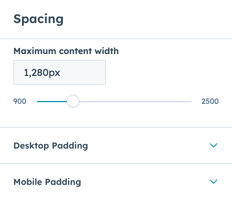
Forms
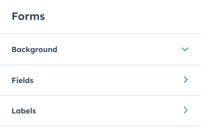
Fitmax gives you forms design control in a center place. Control your forms background, Fields and others. Also you can customize each in detail.
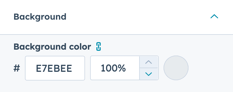
Background color :
You can adjust the background color of your theme forms here. Initially we used #E7EBEE this color for forms background color.
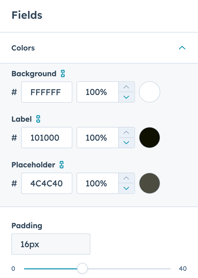
Fields :
You can adjust the fields of your forms in Fitmax Pro. Adjust your forms fields Font, Background and others.
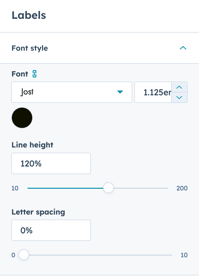
Labels :
You can specifically customize the labels of the form.
3
Templates
Fitmax Pro has various 19 ready to use templates. Create your site page / landing page with just one click. And also update the controls and styles whenever you want.
Here is the all templates details:
About:
The About template is designed to build a powerful narrative around your fitness brand’s history, philosophy, and professional authority. By combining personal storytelling with tangible proof of expertise, this page transforms casual visitors into loyal community members.
Key Modules Used:
Key Modules Used:
- Hero Banner: Creates a high-impact visual introduction to your brand's mission.
- Our Story: A dedicated section to share your gym’s journey, core values, and philosophy.
- Featured Programs : Highlights a flagship training service to guide users toward your primary offerings.
- Trainers: Showcases your professional coaching staff with interactive social links and profiles.
- Trainer Qualifications: Establishes deep trust by displaying certifications and professional mastery.
- FAQ: Addresses common inquiries to remove barriers and provide immediate clarity to prospective members.
All Classes:
The All Classes template serves as a dynamic, user-friendly schedule and directory for your gym's diverse group fitness offerings. By combining a high-impact visual montage with a sophisticated filtering system, this template allows members to quickly find and book the specific workouts that fit their goals and availability.
Key Modules Used:
- Hero - Triple Column Montage: Creates a modern, energetic first impression by showcasing three distinct training environments simultaneously.
- Filterable Classes: Provides an interactive interface where users can sort through the class schedule by category (e.g., Yoga, HIIT, Strength) to find the perfect session.
- FAQ: Proactively addresses common questions regarding class levels, required gear, and booking policies to ensure a smooth onboarding experience for new participants.
All Program:
The All Programs template acts as a comprehensive directory for your fitness offerings, providing users with a clear overview of every training path available. By combining a professional showcase with interactive health tools and educational content, this template helps users select the program that best aligns with their personal fitness goals.
Key Modules Used:
- Hero Banner: Provides a bold, motivating entrance that sets the tone for your diverse training catalog.
- Program Showcase: Displays your full range of specialized training services in a customizable, interactive grid.
- BMI Calculator: Adds immediate value by allowing users to calculate their body mass index and identify their specific fitness needs on the spot.
- Modern Blog Cards: Integrates the latest educational articles and training tips to provide additional value and context for your programs.
All Trainer:
The All Trainer template is a high-authority page designed to humanize your brand by showcasing the experts behind the results. It balances professional introductions with undeniable proof of success, creating a persuasive environment that encourages users to book a session with your world-class coaching staff.
Key Modules Used:
Key Modules Used:
- Team Hero Banner: Creates a massive first impression using a multi-image montage and social proof badges to highlight the scale and experience of your entire coaching team.
- Meet The Coaches (Trainers): Provides a professional directory of your staff, featuring interactive social media links and customizable grid layouts for easy browsing.
- Transformation Slider: Builds deep emotional trust by displaying real-world "Before and After" success stories directly alongside the trainer profiles.
- Service Highlight: Focuses on a specific coaching philosophy or specialized service, such as online training, using a flexible layout to drive final engagement.
Blog Listing
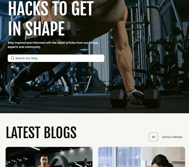
The Blog Listing template serves as the central hub for your fitness insights, news, and educational content. Engineered for clean navigation and high readability, it allows users to explore your entire library of articles through an organized, performance-oriented layout.
- Blog Hero Banner: Provides a bold, high-energy introduction to your blog, setting a professional tone for your content library.
- Blog Pagination: Includes a functional navigation system that allows users to seamlessly browse through multiple pages of content without overwhelming the viewport.
- Tag Filtering: Empowers users to quickly sort and find content by specific categories ensuring they find the most relevant information instantly.
Blog Post
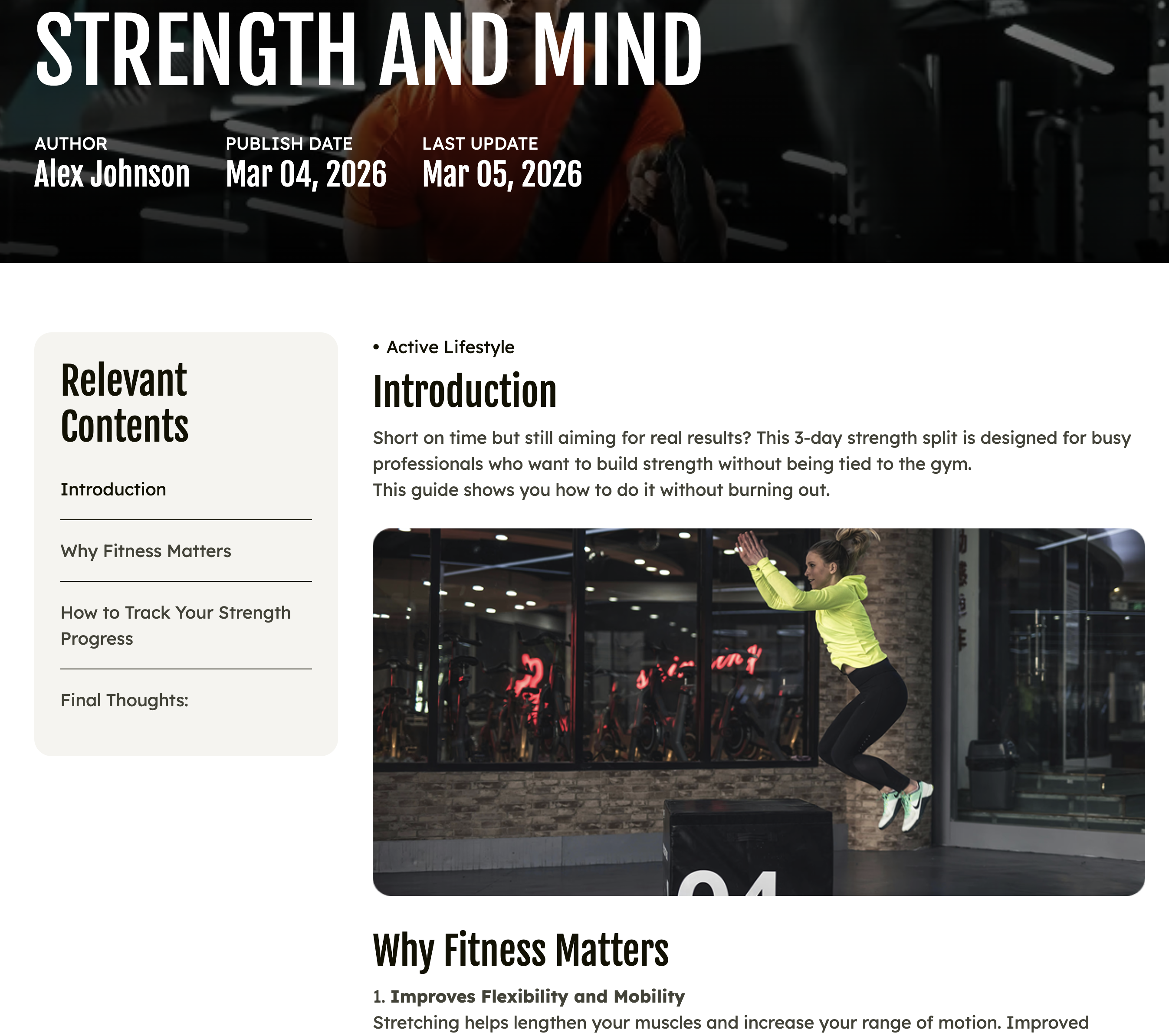
The Blog Post template is a high-performance content layout designed for readability, authority, and deep user engagement. By combining a professional hero introduction with interactive navigation and related content discovery, this template ensures your fitness insights are easy to digest and navigate on any device.
- Blog Hero Banner: Establishes immediate authority by displaying the article title, author name, original publish date, and last update timestamp against a high-impact background image.
- Blog Menu (Sidebar): Enhances the user experience with a "Relevant Contents" directory. This interactive sidebar allows readers to click on any specific section—such as "Introduction" or "Why Fitness Matters"—to be instantly redirected to that part of the post.
- Modern Blog Cards: Strategically placed at the end of the post to drive further engagement by suggesting related articles or trending fitness topics.
Contact:
The Contact template is a high-utility landing page designed to bridge the gap between your digital presence and your physical facility. By providing direct communication channels alongside interactive mapping tools, this template ensures that prospective members can easily find your gym and get their questions answered without friction.
Key Modules Used:
Key Modules Used:
- Contact Us Hero: Features a bold, high-energy introduction with customizable form.
- Contact Us Location: Provides essential proximity tools, including a text-based address field and an interactive map with support for auto-generated addresses or custom HTML embed codes.
Facilities:
The Facilities template is a visually-driven layout designed to showcase the premium environment and high-end equipment your gym offers. By highlighting your physical assets through high-resolution galleries and specific feature lists, this template helps prospective members visualize their training experience before they ever step through the doors.
Key Modules Used:
Key Modules Used:
- Facilities Hero: Provides a high-impact, immersive introduction to your gym's physical space using bold typography and large-scale media.
- All Facilities List: Organizes your various gym zones or amenities into a clean, searchable directory.
- Image Content with Counter: Combines professional lifestyle or equipment imagery with dynamic animated counters to highlight key stats, such as total floor space or the number of premium machines available.
- Facilities Showcase: Features a curated selection of your most impressive gym areas, using a professional grid to emphasize quality and variety.
- Dynamic Grid Gallery: Offers a sophisticated, multi-column visual layout for displaying a wide array of interior photos, ensuring your facility looks modern and inviting on any device.
Gallery:
The Gallery template is a visually immersive layout designed to provide a 360-degree view of your fitness community. By combining high-action training photography, facility tours, and social proof, this template allows prospective members to "feel" the atmosphere of your gym before their first visit.
Key Modules Used:
Key Modules Used:
- Hero Banner: Establishes a bold visual theme and sets the energetic tone for the gallery experience.
- Dynamic Grid Gallery: Utilizes a sophisticated, multi-column layout to showcase a wide array of high-resolution images across different training categories.
- Facilities Showcase: Highlights the premium environment and specialized equipment available to members through a structured, professional grid.
- Clients Testimonial Slider: Pairs powerful imagery with real success stories, adding a human element to the visual tour.
Home Version 1:
The Home Version 1 template is a high-energy, conversion-optimized landing page designed to serve as the ultimate digital storefront for your fitness brand. By strategically layering social proof, product commerce, and service highlights, this template provides a comprehensive overview that guides new visitors from initial interest to a committed membership.
Key Modules Used:
Key Modules Used:
- Hero Banner: Delivers a bold, high-impact introduction that immediately establishes your brand's mission and energy.
- Service-Cards: Organizes your core training offerings into a clean, interactive grid for easy exploration.
- Marquee: Adds a modern, dynamic scrolling element to highlight key slogans, announcements, or brand values.
- Featured-Partners: Builds professional credibility by showcasing logos of affiliated brands, equipment providers, or corporate sponsors.
- Product-Showcase: Highlights top-tier fitness gear or supplements with direct "Buy Now" integration to drive retail revenue.
- Clients-Testimonial-Slider: Features rotating success stories and quotes to provide essential social proof and build community trust.
- Pricing-Comparison: Presents membership tiers in a transparent, side-by-side format to simplify the decision-making process for new sign-ups.
- Service-Highlight: Focuses on a specific flagship program or unique selling point using a high-contrast, media-rich layout.
Home Version 2:
The Home Version 2 template focuses on authority and results, making it the ideal choice for performance-oriented fitness brands. By prioritizing coach expertise and data-driven transformation metrics, this layout quickly builds the trust necessary to convert serious athletes and fitness enthusiasts.
Key Modules Used:
- Hero Banner: Sets a powerful tone for the site with high-impact visuals and clear primary calls-to-action.
- Featured Programs: Spotlights specialized training tracks to immediately engage users with specific fitness goals.
- Trainers: Introduces your expert staff with interactive cards, highlighting the human element and professional guidance of your brand.
- Transformation Slider: Provides irrefutable social proof by showcasing side-by-side "Before and After" results along with detailed client metrics.
- BMI Calculator: Offers an interactive utility that provides immediate value, helping visitors assess their health status and personal needs.
- FAQ: Proactively addresses common concerns and logistical questions to streamline the onboarding process for new members.
Home Version 3:
The Home Version 3 template is a sophisticated, content-rich layout designed for comprehensive fitness hubs and multi-disciplinary gyms. By utilizing unique montage visuals and tabbed information structures, this template effectively organizes a vast amount of facility information and class schedules into a seamless, high-end browsing experience.
Key Modules Used:
Key Modules Used:
- Hero - Triple Column Montage: Creates a dynamic and modern first impression by displaying three distinct high-impact images simultaneously, perfect for showcasing the variety of your training environment.
- Facilities Showcase: Highlights your premium gym zones and high-end equipment through a professional, structured grid.
- Tabbed Class Showcase: Organizes your daily or weekly class schedules into an interactive tabbed interface, allowing users to easily toggle between different categories like Yoga, HIIT, or Strength.
- Image Content with Counter: Merges professional photography with animated statistics to highlight key brand milestones, such as total members served or years of experience.
- Pricing Comparison: Displays your membership tiers in a transparent, side-by-side format to simplify the conversion process.
- Featured Partners: Showcases logos of affiliated brands and sponsors to build professional credibility and trust.
- Stories Testimonial Slider: Features immersive, narrative-driven client feedback to build a sense of community and proven success.
- Service Highlight: Provides a deep dive into a specific program or feature using a flexible, media-heavy layout designed for maximum engagement.
Meeting:
The Meeting template is a highly functional, action-oriented layout designed to convert digital interest into physical appointments. By prioritizing a direct booking interface alongside a comprehensive overview of your gym's assets, this template streamlines the process for prospective members or corporate partners to schedule tours, consultations, or personal training assessments.
Key Modules Used:
Key Modules Used:
- Book a Meeting: Provides a seamless, integrated scheduling interface that allows users to book sessions or tours directly on the page.
- All Facilities List: Showcases the full range of your gym's zones and amenities, giving users a clear preview of the environment they will experience during their scheduled visit.
Program:
The Program template is a results-driven layout designed to provide a comprehensive look at specific training tracks. By combining the history of the program with interactive schedules and proven results, this template gives prospective members all the information they need to commit to a specific fitness journey.
Key Modules Used:
- Hero Banner: Introduces the specific program with high-impact visuals and a clear, motivating call-to-action.
- Our Story: Provides the background and philosophy behind the training track, helping users connect with the "why" behind the workouts.
- Tabbed Class Showcase: Organizes program schedules into an interactive tabbed interface, making it easy for users to find specific class times and types.
- Trainers: Features the expert coaches who lead the program, building personal trust and professional authority.
- Transformation Slider: Showcases real-world results from previous participants to provide undeniable proof of the program's effectiveness.
- FAQ: Proactively answers common questions regarding program intensity, requirements, and logistics to remove any remaining friction.
Shop:
- Hero Banner: Provides a bold, lifestyle-oriented entrance that highlights your current retail focus or seasonal promotions.
- Product List: The core of the shopping experience, this dynamic module fetches live data from the Products CRM object and includes advanced tools like a live search bar, price filtration, and a toggle to switch between Grid and List views.
Thank You:
The Thank You template is a streamlined confirmation page designed to provide a positive and professional conclusion to a user's interaction. Whether a client has just completed a purchase, signed up for a membership, or sent an inquiry, this page ensures they receive immediate feedback and clear guidance on what to do next.
Key Module Used:
Key Module Used:
- Thank You: A clean, high-contrast module that displays a success message (e.g., "Your order is confirmed"), professional brand media, and a primary Call-to-Action button to lead users back to the homepage or their next destination.
Trainer Details:
The Trainer Details template is a high-authority personal landing page designed to establish a specific coach as a premier expert in their field. By combining deep biographical information with verified achievements and client success stories, this template creates the professional trust necessary for members to commit to a personal training journey.
Key Modules Used:
- Professional Profile Hero: Provides an immediate, high-impact introduction to the trainer, featuring their portrait and primary area of expertise.
- Trainer Achievement: Showcases the coach's track record using dynamic counters and labels to highlight key metrics like years of experience or total clients transformed.
- Featured Programs: Spotlights the specific training tracks or classes led by this trainer, allowing users to see their direct offerings.
- Trainer Qualifications: Establishes tangible professional authority by displaying multiple certification images and specialized mastery lists.
- Stories Testimonial Slider: Builds emotional social proof through immersive, narrative-driven feedback from the trainer's actual clients.
- FAQ: Proactively addresses common questions regarding the trainer's specific methods, availability, and session requirements.
4
Global Modules
Header
The Navbar is the foundational navigation component of the FitMax theme, offering two distinct levels of complexity to suit your site’s architecture. Whether you need a streamlined menu or a comprehensive Mega Menu, this module provides total control over your global header and user journey.
Navbar Modes
- Simple Navbar:
- HubSpot Menu Integration: Quickly populate your navigation by selecting an existing menu directly from your HubSpot settings.
- Ease of Use: Ideal for sites with straightforward page structures.
- Advanced Navbar (Mega Menu):
- Mega Menu Categories: Choose between two specialized layouts:
- Only Links Mega Menu: A streamlined, text-based navigation experience.
- Featured and Links Mega Menu: An immersive layout featuring a "Featured" card alongside standard links. If selected, a card appears where users can include an image, title, and subtitle, with the ability to redirect to any specific page.
- Flexible Structure: Add and manage mega menu column items to organize your nav elements under custom column labels.
- Layout Controls: Users have the access to reverse the mega menu columns or remove the mega menu bottom bar entirely.
- Row Control: Precisely adjust the columns per row to ensure a balanced and professional look.
Layout & Alignment Controls
- Precision Alignment: Take full control over the visual balance of your header with dedicated controls for Logo Alignment and Menu Alignment.
- Navbar Behavior: Customize how the navigation interacts with page scrolling:
- Enable Sticky Navbar: Activating this ensures the navbar remains fixed at the top of the viewport as the user scrolls.
- Enable Floating Style: Detaches the navbar from the top, allowing your Hero or Banner section to start at the absolute top ($0\text{px}$) of the page and appear behind a transparent header.
- Note: Users can select one, both, or none of these behaviors based on design preference.
Visual Styling & Backgrounds
- Background Type Options: Define the aesthetic foundation of your header with three distinct background types:
- Transparent: Seamlessly blends the navbar into the section below it.
- Solid Color: Provides a clean, high-contrast block for maximum legibility.
- Gradient: Adds a modern, dynamic color transition across the header.
Core Customization Features
- Brand Identity: Easily upload and customize your Logo, including a dedicated link to your homepage.
- Search Functionality:
- Toggle Control: Show or hide the search button based on your needs.
- Contextual Results: Define exactly what the search returns, such as Website Pages, Landing Pages, or Blog Posts.
- Global Utilities:
- Language Switcher: Includes a built-in language toggle for multi-region support.
- E-commerce Integration: A dedicated Add to Cart button ensures your shop is always accessible.
- Call-to-Action (CTA): Features a high-visibility primary CTA button to drive immediate conversions.

Footer
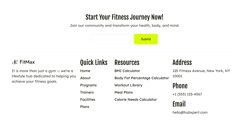
The Footer serves as the comprehensive anchor for your website, providing essential navigation, contact information, and lead generation opportunities. Designed with a clean, multi-column layout, it ensures that visitors always have a clear path to deeper content or direct support as they reach the end of any page.
For a more detailed idea, check this video
- Integrated Lead Generation:
- Optional Top Form Section: The footer includes a dedicated top section where you can add a HubSpot form (e.g., newsletter signup) to capture leads.
- Compelling CTA: Pair your form with a bold heading like "Start Your Fitness Journey Now!" to encourage immediate community engagement.
- Brand Identity & Messaging:
- Customizable Logo: Reinforce your brand by uploading your primary logo.
- Subtext/Bio Section: Include a brief mission statement or "About Us" subtitle to remind users of your gym’s core values.
- Flexible Multi-Navigation:
- Multiple Menu Columns: Organize your site links into distinct categories such as "Quick Links" and "Resources".
- Scalable Links: Use the navigation section to add multiple menus, making it easy for users to find specialized content like calculators, meal plans, or class schedules.
- Comprehensive Location Section:
- Direct Contact Info: Clearly list your physical Address, Phone number, and official Email for professional accessibility.
- Authority Building: Presenting clear contact details at the bottom of every page reinforces trust and professional transparency.
5
Modules
Fitmax Pro equips you with a robust library of more than 40+ interactive, reusable modules. These are the building blocks you need to create diverse pages across any category—from high-conversion landing pages to detailed service pages. This extensive collection allows you to assemble unique designs quickly, reducing development time and maximizing your creative flexibility.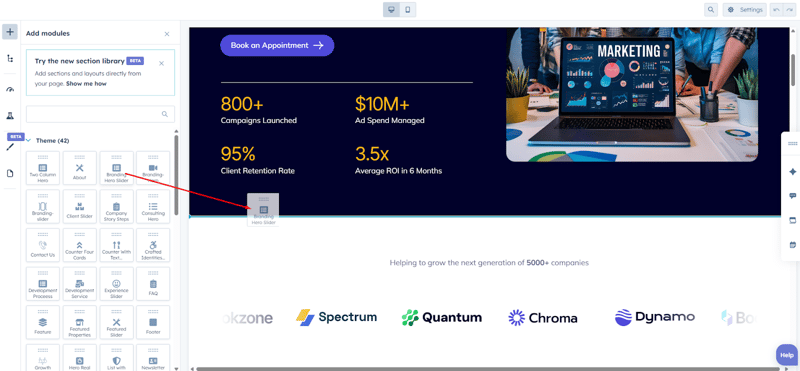
All Facilities List:
The All Facilities List is an interactive directory designed to showcase your gym’s amenities or service offerings. It uses a modern accordion-style list that keeps your page clean while adding an engaging "reveal" effect through image hover interactions.
- Facility List (Repeater): Easily add, remove, or reorder your facilities using a simple repeater field. Each item supports a bold title to grab attention immediately.
- Interactive Image Hover: To keep the layout minimalist yet informative, an image pops up dynamically when a user hovers over a specific facility name. This is perfect for giving visitors a visual "sneak peek" of your equipment or classes.
- Custom Redirection: Each facility item includes a dedicated button (featuring a modern arrow icon) that allows you to redirect users to specific landing pages, booking forms, or detailed service descriptions.

Blog Hero Banner:
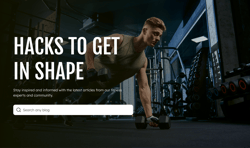
The Blog Hero Banner module is a dynamic, high-energy header designed to anchor your blog or articles page. It combines immersive background media with essential navigation tools to ensure your readers find exactly what they are looking for while staying engaged with your brand’s aesthetic.
- Search Functionality Toggle: Improve user experience by enabling or disabling a built-in Search Bar. When active, it allows visitors to quickly search through your library of blogs directly from the hero section.
- Versatile Background Media: Set the tone of your page by choosing between a Background Image or a Background Video. You have full customization control over the media, including overlays, to ensure text remains legible against high-action visuals.
- Class Details Section: This module includes a dedicated Class Details group. Use the provided rich text field to share specific information about training programs or classes. For maximum flexibility, this entire section can be toggled on or off depending on the purpose of your page.
- Customizable Content: Easily edit the main heading and subtext to fit your specific niche, whether you're sharing fitness hacks, nutrition tips, or community updates.
- Customizable Layout: Change the height separately for both desktop and mobile. The section max-width and content max-width is also customizable.
There is option to change the content alignment on mobile, and also change the direction of column in the desktop view.
BMI Calculator:
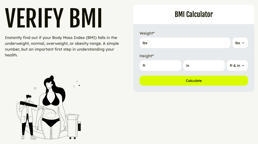
The BMI Calculator is a high-utility engagement tool that provides immediate value to your visitors. By allowing users to calculate their Body Mass Index directly on your site, you establish your brand as a helpful authority in their fitness journey. This module is built with the same precision and ease-of-use as our other popular calculators available on the HubSpot Marketplace.
- Dual Metric Support: The calculator is globally accessible, supporting both Imperial (lbs/ft/in) and Metric (kg/cm) systems. Users can toggle between these units to ensure accurate data entry.
- Dynamic Result Pop-ups: To make the experience more visual and informative, you can enable pop-up images that trigger based on the user's result. Different images can be set for each category: Underweight, Normal, Overweight, and Obesity.
- Total Content Control: Every piece of text—from the "Verify BMI" title and descriptive paragraphs down to the field labels and button text—is fully editable within the HubSpot page editor.
We Have other health tools calculator. You can download these from the marketplace:
Calorie Calculator
Waist To Hip Ratio Calculator
Body Fat Percentage Calculator
Calorie Calculator
Waist To Hip Ratio Calculator
Body Fat Percentage Calculator
Book a Meeting:
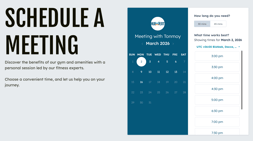
The Book a Meeting module is designed to bridge the gap between interest and action. By integrating HubSpot’s powerful scheduling engine directly into your page, you provide a frictionless way for potential members to book consultations, tours, or personal training sessions in real-time.
- Native HubSpot Integration: Seamlessly connect your existing HubSpot meeting links. Once linked, the module automatically pulls in your availability calendar, allowing users to book sessions without ever leaving your site.
- Flexible Layout Controls: Choose how your booking interface sits on the page. You can adjust the container width to ensure the calendar perfectly complements your surrounding content.
- Customizable Content & Typography: You have full control over the "Schedule a Meeting" header and the descriptive subtext. Use the rich text editor to explain the benefits of a personal session or to provide specific instructions to the user.
- Design & Background Customization: Tailor the module’s visual impact with extensive design options. You can modify background colors, spacing, and styling to match your brand's specific color palette and aesthetic.
Button:
The Buttons module is the primary interaction tool for the FitMax theme. Designed for high visibility and consistent branding, this module allows you to create a sequence of call-to-action points that guide users through your site’s conversion funnel.
- Repeater Field Functionality: Efficiently manage multiple buttons within a single section. The repeater field allows you to add, remove, and reorder buttons quickly to create horizontal or vertical button groups.
- Dual Style Variations: Switch between Primary and Secondary button variants to establish visual hierarchy on your page.
- Flexible Layout Modes:
- Text & Icon: The standard CTA with a descriptive label and supporting icon.
- Icon Only: Perfect for minimalist designs or social media links where only a graphical representation is needed.
- Full Design Customization: Each variation comes with a comprehensive suite of styling controls:
- Typography: Choose your font family, size, and weight.
- Colors & Hover Effects: Define specific colors for text, icons, and backgrounds for both the static and hover states.
- Spacing & Borders: Fine-tune the button's presence with adjustable padding and border settings.
- Integrated Icon Library: Add and customize icons to provide visual cues that increase click-through rates.



Clients Testimonial Slider:
The Clients Testimonial Slider is designed to build trust and social proof by highlighting the real-world success stories of your members. With a sleek, modern slider interface, you can showcase multiple testimonials in a compact space without overwhelming the page layout.
- Dynamic Slider Navigation: Visitors can effortlessly browse through testimonials using the built-in slider functionality. You can add as many client stories as needed to create a rotating gallery of success.
- Comprehensive Content Control: Easily update the section Label and the main Title to match your specific marketing message.
- Customizable Author Profiles: Each testimonial card allows for a high-quality author image, name, and professional title/role, adding a personal and authentic touch to every story.
- Advanced Styling Options: * Background Management: Change the entire section's background image to set a unique mood or aesthetic.
- Custom Buttons: Modify the slider navigation buttons with full control over background colors, icon selection, and icon colors.
- Visual Flair: Fine-tune the look of your slider by changing the Progress Bar color and the Image Border color for a perfectly branded finish.

Contact Us Hero:
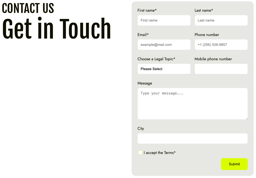
The Contact Us Hero module serves as the primary gateway for member inquiries and lead generation. By combining a clean, professional aesthetic with a high-conversion form layout, this module ensures that getting in touch is a seamless experience for your visitors.
- Integrated Form Placement: Easily embed any HubSpot form into the module. The layout is optimized to handle various field types—including text inputs, dropdowns, and message boxes—while maintaining a structured, balanced look.
- Flexible Container Settings: Tailor the module to your specific page design by adjusting the Container Max Width. This allows the form and text to sit comfortably whether you prefer a full-width immersive look or a more centered, compact feel.
- Background Personalization: Change the background settings to match your site’s theme. Whether you want a solid brand color or a subtle texture, the customization options allow the form to pop against its backdrop.
- Responsive Layout: The two-column design automatically reflows for mobile devices, ensuring your "Get in Touch" section remains accessible and easy to use on any screen size.
Contact Us Location:
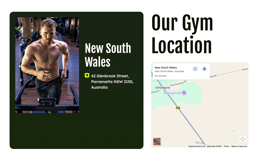
The Contact Us Location module provides a professional and interactive way for members to find your facility. By combining a physical address with a live map, this section removes friction for prospective clients, making it easy for them to transition from online interest to an in-person visit.
- Precise Location Details: Use the dedicated text fields to write down your exact gym address.
- Dual-Option Interactive Map: Under the map settings, you have the flexibility to choose how your location is displayed:
- Type an Address: Simply enter your location, and the module will automatically generate a dynamic map.
- Paste Embed Code: For specific custom views, you can paste a direct HTML embed code from mapping services.
- Customizable Map Title: Personalize the map interface by setting a specific title for the map pin or header.
- Action-Oriented Media: Pair your location data with a high-quality image of your facility or an athlete in training to maintain the high-energy aesthetic of your brand.
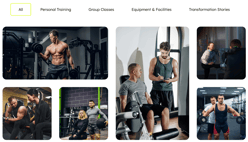
Dynamic Grid Gallery:
The Dynamic Grid Gallery is a high-performance visual module designed to showcase your facility, transformations, or workout programs in a sophisticated, masonry-style layout. This module is built for flexibility, allowing you to organize large amounts of visual content into digestible, filterable categories.
- Multi-Level Organization: * Filter Categories: Create custom navigation tabs using a repeater field to help users find specific content.
-
- Gallery Blocks: Inside each category, you can add multiple gallery blocks to keep your content structured.
- Adaptive Grid Design: * Add up to 7 images per block."All" Category Toggle: You have the option to enable or disable the "All" tab, which aggregates images from every category into a single master view.
- Advanced Load-More Functionality: * Keep your page load speeds fast by restricting the number of blocks displayed initially.
- Includes a customizable "Load More" button, where you can specify exactly how many new blocks appear with each click.
Facilities Hero:
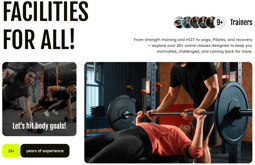
The Facilities Hero module is a high-energy introductory section designed to showcase the scale and expertise of your fitness center. By combining large-scale imagery with "social proof" metrics, this module immediately establishes credibility and motivates new visitors to explore your offerings.
- Trainer Avatar Repeater: Build authority by showcasing your team of experts. Use the repeater field to add multiple trainer headshots, creating a stacked avatar effect.
- Customizable Prefix Labels: Add dynamic labels next to your trainer avatars to emphasize the size and experience level of your coaching staff.
- Dual-Image Media Section: This module features a bold, split-media layout. You can upload two distinct images to highlight different aspects of your gym.
- Interactive Image Overlay: The left-hand image includes a customizable text overlay, allowing you to add motivational messaging directly onto your visuals.
- Experience Badge: Feature your brand’s longevity with a dedicated bottom badge. You can customize both the numerical value and the descriptive text.
Facilities Showcase:
The Facilities Showcase module is a highly interactive, accordion-style showcase designed to highlight different areas of your gym—such as the Cardio Zone, Strength Area, or Yoga Studio. It uses an expandable card layout that saves vertical space while providing a deep dive into each facility when selected.
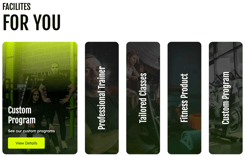
- Facilities Card (Repeater): Use the repeater field to create as many facility cards as you need. Each card acts as an interactive pillar that expands to reveal more detail when clicked or hovered.
- Rich Content Overlays: Each card supports high-quality image uploads with customizable overlay text. You can easily define a Title and a Description for every section.
- Integrated Call-to-Action: Every expanded card features a dedicated button, allowing you to link users directly to class schedules or membership sign-ups for that specific facility.
- Advanced Color Customization:
-
-
- Active Card Overlay: Precisely control the background gradient or solid color overlay that appears when a card is expanded to ensure text legibility.
- Inactive Card Overlay: Customize the appearance of collapsed cards to maintain a cohesive look while signaling to the user that they are interactive.
-
FAQ:
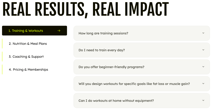
The FAQ module is a high-utility, multipurpose component designed to address member concerns while improving your site's SEO. It offers a structured way to present information, whether you are providing a simple list of questions or a deep-dive knowledge base categorized by topic.
Versatile Layout Options
This module is highly adaptable, offering three distinct ways to present your content:
- Categorized Knowledge Base: Enable the Category option to organize your FAQs into logical groups. Users can navigate between categories on the left, which dynamically updates the list of questions on the right.
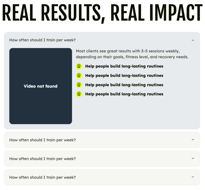
- Media & Goals Layout: If categories are disabled, you can transform the FAQ into a rich content section. This layout allows you to enable a Media Section (Image or Video) alongside your questions and include a Goals List to reinforce your brand's value proposition.
- Custom Border Styling: Within the layout settings, you can toggle between two design types:
- Border Half: A minimalist look with subtle separators.
- Border Full: A more structured, boxed-in appearance for the FAQ table.
Core Features
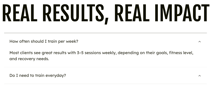
- Fully Searchable Content: All questions and descriptions are indexed, making it easier for users to find answers and for search engines to crawl your site.
- Rich Text Descriptions: Use the HubSpot rich text editor for each FAQ answer to include links, bold text, or lists.
- Accordion Interaction: Uses a smooth, space-saving accordion effect that allows users to expand only the answers they are interested in.
- Complete Style Control: Customize colors, icons, and typography to ensure the FAQ section feels like a native part of your FitMax theme.
Featured Partners:
The Featured Partners module is a streamlined, professional component designed to showcase the brands, sponsors, or organizations that support your business.

- Dynamic Logo Repeater: Effortlessly add, remove, or reorder partner logos using a user-friendly repeater field. This allows you to scale your partner list as your professional network grows.
- Layered Background Controls:
- Module Background: Customize the outer section’s background to blend seamlessly with your page design.
- Card Background: Adjust the styling of the inner container (the card) to make the logos pop or to create a high-contrast visual focus.
- Clean Grid Layout: The module automatically organizes logos into a balanced, easy-to-read grid that looks great on both desktop and mobile devices.
Featured Programs:
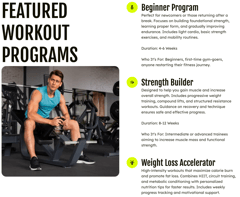
The Featured Programs module is a comprehensive content section designed to showcase specialized training blocks, individual trainer philosophies, or signature workout routines.
- Dynamic Media Section:
- Image Selection: Easily upload a high-quality image representing the program or the lead trainer.
- Interactive Overlays: Toggle an overlay on the image to display a name and integrated buttons, such as social media icons, to connect users directly with your coaching staff.
- Flexible Content Layouts: Use the Layout Type setting to choose between Show Heading Left or Show Heading Right, allowing you to alternate the visual flow of your page and keep users engaged.
- Feature List (Repeater): Highlight specific program benefits or details using a repeater field for consistency.
- Each feature item includes its own Redirect Button, giving you the flexibility to link to different landing pages, booking forms, or detailed guides for every point mentioned.
- Rich Text Integration: * The content area supports detailed descriptions to explain the core strength, mindful movement, or alignment goals of your sessions.
- Includes a dedicated Goal Icon section to call out the primary program name or mission statement with high-visibility styling.
- Overlay Customization: User has access for overlay texts, and can add multiple overlay social icons.
Filterable Classes:
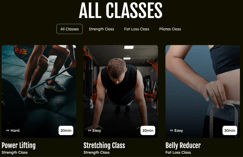
The Filterable Classes module is a powerful, high-performance gallery designed to organize and showcase your full range of workout sessions. By allowing users to filter by category, you make it easy for members to find the exact class that matches their fitness level and interests.
- Category-Based Filtering: Use the repeater field to create multiple categories. This generates a dynamic navigation menu at the top, allowing users to instantly filter the classes displayed below.
- Dynamic Class Cards: Add as many class cards as needed. Each card supports a high-quality background image, a bold Title, and a descriptive Label.
- Flexible Column Layout: Customize the grid to match your page design by choosing the number of columns displayed.
-
- Styling: Fully customize the overlay colors and transparency to ensure your text remains perfectly legible against any background image.
- Positioning: Change the position of the overlay badge to different corners of the card to highlight class difficulty or duration.
Hero Banner:
The Multi-Functional Hero Banner is a high-impact, versatile header designed to adapt to any page's needs. From immersive storytelling with background video to action-oriented landing pages, this module provides the ultimate creative control over your site's "above the fold" experience.
- Diverse Background Options: Set the tone of your page by choosing between a Static Image, High-Definition Video, or a specific Solid Color/Gradient. For enhanced readability, you can overlay a custom color directly on top of videos or images.
- Dynamic Information Overlays: Customize the hero's message with a variety of integrated overlay elements:
- Class Details: Feature-specific training info using a rich text field.
- Action Buttons: Add multiple call-to-action buttons to drive conversions.
- Precision Layout Control: Ensure your content looks perfect on every screen with independent padding style controls for mobile and desktop. This allows you to fine-tune the spacing and vertical height to match the device.
- Multiple Design Variations: The module can be modified into several distinct visual variations, ranging from a clean, text-centric look to a complex triple-column montage that combines imagery and proof points.
-
Rich Typography: Fully editable main headings and subtext allow you to communicate your value proposition—whether it’s "Fit Body, Clear Mind" or a specific "Grab a Spot" offer.

Hero - Triple Column Montage:
The Hero - Triple Column Montage is a dynamic, multi-layered header designed to create an immediate impact. By combining high-energy photography with bold typography and interactive "proof points," this module effectively communicates your brand's scale and value proposition the moment a visitor lands on your page.
- Three-Column Visual Strategy: The module uses a sophisticated split-screen layout that balances immersive imagery with actionable content.
- Offer Card (Left Column): A dedicated dark-themed card designed to highlight specific promotions, such as "Free trial sessions for new members." This section includes a prominent primary button to drive immediate conversions.
- Interactive Counter (Right Column): Build credibility with an integrated counter badge overlaid on a supporting image. This provides instant social proof of your facility's resources.
- Descriptive Subtext: Below the counter, a flexible text area allows you to detail your coaching philosophy, whether focusing on personalized plans, nutrition advice, or lifestyle integration.
- Dual-Image Support: Upload two distinct, high-quality images to represent different facets of your training environment, creating a rich visual montage.
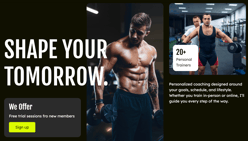
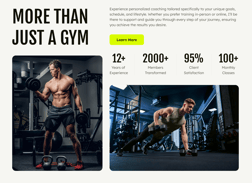
Image Content with Counter:
The Image Content with Counter module is a highly visual, data-driven section designed to highlight your brand's success and scale. By combining immersive imagery with dynamic counters, this module provides immediate social proof, showcasing key performance metrics like client satisfaction, member growth, or years in business.
- Dual Media Support: Feature two high-quality images that represent your facility or training style. The balanced layout ensures your visuals work in tandem with your statistical data.
- Dynamic Counter (Repeater): Use the repeater field to showcase your most impressive stats. For each counter, you can define:
- Rich Text Integration: Includes a dedicated area for a bold heading and a descriptive paragraph to provide context for your success stories.
- Layout Flexibility (Column Reverse): Within the layout settings, you can toggle Column Reverse. This allows you to flip the orientation of the images and content, giving you the freedom to alternate designs across different pages to keep the user experience fresh.
Marquee:
The Marquee module is a high-energy, continuous-scrolling banner designed to draw attention to key announcements, values, or membership benefits.

- Customizable Content (Repeater): Effortlessly add multiple items to your scrolling banner. For each item, you can:
- Change the Icon: Select the perfect visual cue to match your message.
- Edit the Text: Use the text field to write concise, punchy phrases that resonate with your audience.
- Variable Animation Speed: Take control of the module's energy by adjusting the scrolling speed. Whether you want a slow, sophisticated glide or a fast-paced, high-energy scroll, the speed is entirely in your hands.
- Interactive "Pause on Hover": Improve readability and user engagement with a dedicated toggle that allows the animation to pause when a user hovers over the text.
- Background Color: Modify the banner's background color to make it stand out against other page sections.
Icon & Text Color: Fine-tune the color of your icons and typography to ensure maximum contrast and brand consistency.
- Seamless Loop: The marquee is engineered to loop indefinitely, providing a smooth, uninterrupted visual experience for every visitor.
Meet The Coaches:
The Meet The Coaches module is a premium directory designed to highlight the expertise and personality of your training staff. This module uses an intuitive filtering system that allows members to find coaches based on their specific training goals, such as Strength, Performance, or Weight Loss.
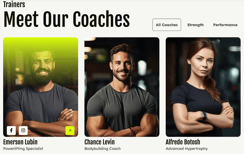
- Categorized Team Directory.
- Filter Categories (Repeater): Organize your staff into logical groups using a primary repeater field. This creates a dynamic navigation menu that filters the coaches displayed below.
- Coach Cards (Nested Repeater): Within each category, you can add multiple individual coach cards.
- Rich Profile Details: Each card is a complete mini-profile, supporting:
-High-Quality Imagery: Upload a professional portrait of the coach.
-Coach Title & Designation: Clearly display their name and their specific area of expertise.
- Flexible Grid Layouts: Under the Layout and Alignment settings, you can choose the density of your gallery by selecting between 2, 3, or 4 columns. This ensures your team page looks balanced, whether you have three coaches or thirty.
- Interactive Card Overlays: * Drive deeper engagement with customizable overlay buttons.
- Each button can be easily linked to a coach’s full bio, social media profiles, or a direct booking link.
Modern Blog Cards:
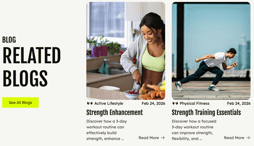
The Modern Blog Cards module is an automated content feeder designed to keep your website fresh and engaging. By dynamically fetching your most recent insights, this module ensures that visitors always have access to your latest fitness tips, nutrition advice, or community news without requiring manual updates every time you publish.
- Dynamic Blog Fetching: Simply select your desired blog type, and the module will automatically retrieve and display the two most recent articles. This keeps your home or landing pages current with minimal effort.
- Automated Metadata Display: Each card automatically pulls in essential post information, including the Category (e.g., "Active Lifestyle"), the Publish Date, and the Featured Image.
- Customizable Visual Overlays: Maintain perfect brand consistency by adjusting the overlay colors on the blog cards. This ensures that post titles remain sharp and legible regardless of the featured image used.
- Direct Navigation: Includes a prominent "See All Blogs" call-to-action button, making it easy for users to dive deeper into your full library of content.
- Granular Styling & Animation Controls: Take full control of the module's aesthetics by customizing the font colors for every text element. Plus, you can bring the section to life using built-in toggles to Enable Heading Animation, Enable Body Text Animation, and Enable Section Animation.
Our Story:
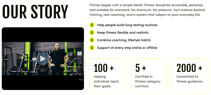
The Our Story module is a comprehensive storytelling component designed to convey your gym's history, mission, and unique philosophy.
- Versatile Formats: Choose the best way to tell your story by selecting between a High-Resolution Image, a Hosted Video, or an Embedded Video (YouTube/Vimeo).
- Aspect Ratio Control: Fine-tune the presentation of your media by adjusting the aspect ratio to perfectly fit your page layout and content density.
Flexible Service Lists:
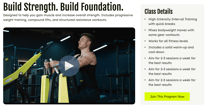
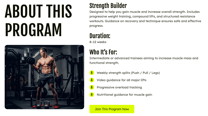
- Class & Detail Lists: Highlight specific training methodologies or program features (e.g., "High-Intensity Interval Training with quick breaks"). This section can be enabled or disabled based on your needs.
- Goals & Values Repeater: Use the secondary repeater list to showcase your core objectives (e.g., "Help people build long-lasting routines") with supporting icons.
Data-Driven Stats (Counter):
- Build immediate authority by featuring your most impressive credentials in the dedicated Counter Stats field.
- Easily add Counter Numbers and Stat Labels to provide tangible proof of your expertise.
Pricing Comparison:
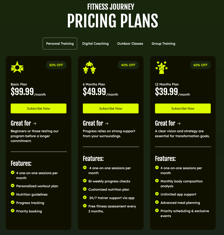
The Pricing Comparison module is a strategic conversion tool designed to present your membership options in a clear, high-contrast grid. By organizing plans into distinct categories and highlighting key features, this module helps prospective members quickly identify the best value for their fitness goals.
-
Plan Categorization: Effortlessly organize your offerings into multiple categories using a primary filter. This allows users to toggle between different sets of plans, keeping the interface clean and focused.
-
Dynamic Pricing Cards: Use the repeater field to create multiple pricing cards per plan.
-
Transparent Pricing: Display monthly rates and prominent discount badges to incentivize sign-ups.
-
Individual Call-to-Action: Every card features its own dedicated "Get Started" button, allowing you to link directly to different checkout pages or registration forms for each specific tier.
-
Customizable Layout: Every section is fully editable to match your brand's voice and aesthetic.
-
Precision Styling: Adjust the max-width of the cards and fine-tune internal padding from the style section to ensure the grid looks perfect on all screen sizes.
Product List:
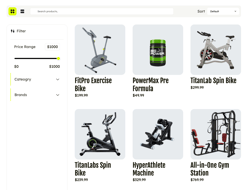
The Product List is a high-performance ecommerce module designed to showcase your gym’s inventory, from professional-grade equipment to nutritional supplements. This dynamic module integrates directly with your HubSpot Products CRM object, ensuring that pricing, availability, and product details are always synchronized and up-to-date.
- Hybrid Data Sourcing:
- CRM Integration: Dynamically fetch real-time data—including product names, images, and pricing—directly from the HubSpot Products CRM object.
- Manual Repeater: Use the HubSpot repeater field to manually create custom product cards for specific promotions or featured items not yet in your CRM.
- Intuitive Discovery Tools: Enhance the shopping experience with built-in tools that help users find exactly what they need:
- Live Search Bar: A prominent search field allows for instant product discovery.
- Advanced Filtration: A sidebar filter allows customers to narrow down results by Price Range (via an interactive slider), Category, and Brand.
- Sorting Options: Users can organize the gallery using a Sort dropdown to view products by default order or specific price points.
- Flexible Layout Toggle: Give your users the choice of how they browse. The module includes a toggle to switch instantly between a Grid View (ideal for visual equipment) and a List View (perfect for comparing technical specifications).
- Professional Product Cards: Each item is presented in a clean, rounded-corner card that highlights the product name and its price point.
Product Showcase:
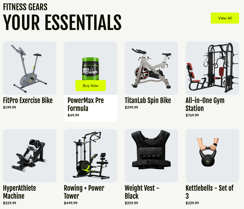
The Product Showcase module is a versatile retail gallery designed to spotlight your top-tier fitness equipment and supplements. This module offers a dual-sourcing approach, allowing you to either automate your inventory display or manually curate a selection of "essentials" to drive targeted sales.
For more clear idea, WATCH THIS VIDEO.
- Hybrid Data Sourcing:
- CRM Integration: Dynamically fetch real-time data—including product names, images, and pricing—directly from the HubSpot Products CRM object.
- Manual Repeater: Use the HubSpot repeater field to manually create custom product cards for specific promotions or featured items not yet in your CRM.
- Interactive Shopping Experience:
- Direct "Buy Now" CTA: Every product card features a high-visibility primary button that appears on hover, allowing users to add items to their cart or proceed to checkout instantly.
- Product Metadata: Automatically displays essential information such as the product title and the current price .
- Clean Visual Gallery:
- Products are organized in a structured, professional grid that emphasizes the product imagery against a clean, neutral background.
- Global Navigation: Features a prominent "View All" button in the header, enabling users to transition from the curated showcase to your full product directory with a single click.
Professional Profile Hero
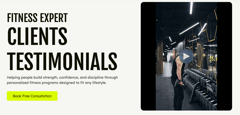
The Professional Profile Hero is a versatile introductory module designed to showcase a specific trainer, program, or core philosophy. It combines high-impact media with clear, persuasive messaging to drive user engagement from the very top of the page.
-
Versatile Formats: Effortlessly switch between a high-resolution Image, a natively hosted Video, or an Embedded video (such as YouTube) to capture your audience's attention.
-
Use the Layout Direction settings to reverse the alignment of your content.
-
Position your media on the right and text on the left, or vice versa, to alternate the visual flow across different pages of your site.
Program Showcase
The Program Showcase module is a highly flexible, card-based gallery designed to display your range of specialized training offerings. Whether you are highlighting "Strength Building Programs," yoga retreats, or seasonal fitness challenges, this module provides a structured yet visually engaging way to guide users toward the specific training that meets their needs.
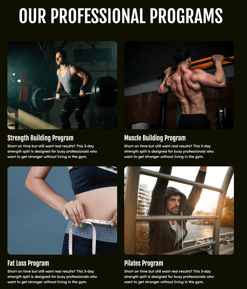
- Dynamic Program Cards (Repeater): Use the repeater field to create a comprehensive library of your programs. Each card serves as a dedicated portal for a specific service.
- High-Impact Imagery: Upload a representative image for each program to create a professional visual first impression.
- Rich Content Support: Customize each card with a bold Program Title and a Descriptive Paragraph
Full Interactivity: Every card is entirely clickable, allowing you to link users directly to a landing page, a detailed schedule, or a registration form via a custom URL.
- Grid Customization: You can customize the number of columns and the overall grid structure to ensure the showcase remains balanced, whether you are featuring three programs or a dozen.
- Active State Overlays: Includes a distinctive yellow arrow icon and a vibrant color overlay on the active card to provide clear visual feedback during user interaction.
Service Cards:
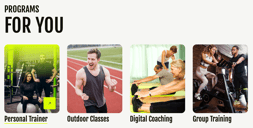
The Service Cards module is a versatile, high-engagement component designed to spotlight your primary gym services. With extensive styling options and interactive hover states, these cards act as professional gateways to your most important offerings.
- Customizable Content (Repeater): Create a series of professional cards where every element is unique. For each card, you can define:
- Bold Titles: Clearly label your services
- High-Quality Imagery: Upload specific background images that reflect the session or program.
- Interactive Overlay Button: Each card features a customizable action button that can be linked to any internal page or external URL.
- Advanced Background Styling: Beyond standard images, you have the power to overwrite the card background with Solid Colors or Gradients. This allows you to create high-contrast text zones or vibrant brand-aligned blocks.
- Borders & Radius: Adjust the thickness and corner roundness to match your theme’s sleek or rugged look.
- Interactive Hover Effects: Define how the card reacts when a user moves their mouse over it—such as color shifts or scale changes—to improve the tactile feel of your site.
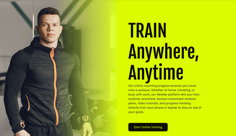
Service Highlight:
The Service Highlight module is a bold, high-contrast section designed to promote specific coaching programs or core membership benefits. This module uses a clean, two-column layout to balance an impactful character image with descriptive text, making it ideal for sections like "Online Coaching" where clear communication of features is essential.
- Dynamic Content Layout: Effectively communicate your value proposition with a primary heading and a detailed rich text area. This section is perfect for listing specific perks like customized workout plans or progress tracking.
- Flexible Column Direction: Tailor the visual flow of your page by adjusting the column direction. You can easily flip the orientation to position the image on the left or right, allowing you to alternate layouts and keep the user engaged as they scroll.
- Customizable Background Styling: Maintain complete control over the section's aesthetic by changing the background color. Whether you want a neutral tone or a vibrant brand color, the module adapts to your design needs.
- Direct Call-to-Action: Includes a prominent primary button with customizable text and linking, designed to drive conversions directly from the highlight.
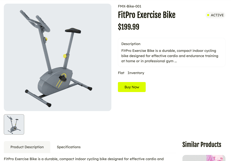
Single Product:
The Single Product module serves as the functional core of your product detail pages. It acts as a dynamic destination that automatically populates with specific item data based on user selection, providing a seamless transition from browsing to purchasing.
- Smart Dynamic Routing: When a user clicks "Buy Now" from the Product List or Product Showcase, the module captures the unique product ID from the URL and redirects the user to this detail page.
- Automated CRM Data Fetching: The module automatically pulls all relevant data for the specific product directly from the HubSpot Products CRM object. This ensures the page always displays:
- Product Name & SKU: Accurate identification for every item Live Pricing: Real-time cost updates directly from your inventory records.
- Availability Status: Displays whether a product is currently "Active" or in stock.
- Rich Descriptions: Detailed insights into product features and benefits.
- High-Conversion Payment Integration: Includes a prominent "Buy Now" button that links directly to a secure payment gateway. This allows users to complete their transaction instantly without additional navigation steps.
- Media Gallery: Supports a primary high-resolution product image along with a thumbnail gallery for secondary views, allowing customers to inspect the equipment from multiple angles.
- Tabbed Specifications: Organizes extensive information into professional tabs, such as Product Description and Specifications, to keep the layout clean and easy to read.
- Smart Recommendations: Includes a "Similar Products" section at the bottom to encourage further browsing and increase average order value.
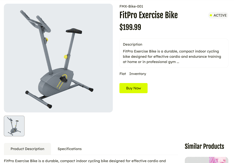
Single Product Manual:
The Single Product Manual module provides a fully static alternative to the dynamic version, giving you absolute creative control over individual product landing pages. Instead of pulling data automatically from a CRM, this module allows you to hand-craft every detail—from technical specifications to custom gallery images—using flexible HubSpot fields.
- Manual Content Creation:
- Custom Product Details: Use HubL fields to manually enter the product name, price, and SKU, allowing for bespoke marketing copy that differs from standard CRM entries.
- Bespoke Descriptions: Craft unique, long-form product stories and benefit lists tailored specifically to the page's audience.
- Flexible Media Gallery:
- Manually upload a primary hero image and use a repeater field to add as many secondary thumbnails as needed.
- This is ideal for highlighting specific craftsmanship details or different color variants of a single item.
- Customizable Technical Tabs:
- Define your own "Specifications" and "Product Description" tabs.
- Since these are not tied to CRM data, you can include custom charts, unique formatting, or specialized icons for each product.
- Direct Payment Link Control:
- Manually assign a unique URL or payment gateway link to the "Buy Now" button.
- This provides the freedom to link to external storefronts, specialized checkout flows, or promotional landing pages.
- Cross-Sell Control:
- Hand-select which items appear in the "Similar Products" section to ensure the most relevant and high-converting upsells are displayed
Stories Testimonial Slider:
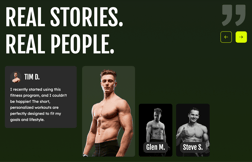
The Stories Testimonial Slider is a premium, high-impact module designed to showcase your brand's success through the voices of your members. By combining large-scale imagery with an interactive slider, this module transforms standard reviews into a compelling visual narrative that builds deep trust and emotional connection.
- Interactive Client Stories: Effortlessly create multiple testimonial cards using a repeater field. Each card supports a high-quality client portrait, their personal transformation story, and detailed member information.
- Customizable Navigation: Take full control over the slider's interface by customizing the Quote Icon and the Slider Navigation Buttons to match your theme's specific aesthetic.
- Glow Effect: Enable a subtle, branded glow behind the primary client image to make them stand out as the hero of the section.
- Grayscale Effect: Toggle a sophisticated grayscale filter on background images to create a professional, "before and after" or artistic feel that focuses attention on the active testimonial.
- Precise Color Controls: From the style section, you can overwrite the background colors for every individual element to ensure perfect legibility and brand alignment:
- Testimonial Text Background
- Primary (Active) Image Background
- Secondary (Inactive) Images Background
- Client Name Badge Background
- Smooth Animation: Features a seamless sliding transition that allows users to browse through your success stories with a modern, app-like experience.
Tabbed Class Showcase:
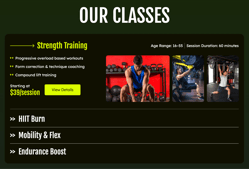
The Tabbed Class Showcase is a high-utility, interactive module designed to detail your specific workout offerings in a compact, organized format. This module is perfect for users who want to compare different class types such as Strength Training or Cardio, without leaving the current section.
- Interactive Class Tabs (Repeater):
- Easily create multiple class items using a repeater field.
- Each item is represented by a bold Class Title that serves as a navigation trigger for the content pane below.
- Detailed Class Information:
- Goal-Oriented Lists: Add multiple benefit or feature points for each class, such as "Progressive overload based workouts," highlighted with vibrant star icons.
- Class Metadata: Include essential session details such as Age Range and Session Duration.
- Starting Price: Feature a clear "Starting at" price point to provide immediate transparency to prospective members.
- Rich Media Support:
- Upload up to 3 images for each class item to showcase the equipment, environment, or actual workout movements.
- The images are presented in a clean, rounded-corner gallery format within the active tab.
- Conversion-Ready Call-to-Action:
- Each class item includes a dedicated "Get Started" button, allowing you to link users directly to a booking calendar or registration form for that specific session.
Team Hero Banner:
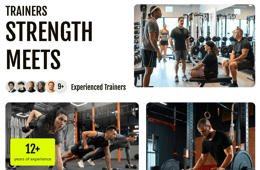
The Team Hero Banner is a high-impact, multi-image header designed to showcase the strength and scale of your coaching staff. This module combines dynamic visual arrangements with key social proof metrics to establish immediate credibility for your fitness team.
- Triple-Image Montage: Create a rich visual narrative by adding up to 3 different images. The layout intelligently organizes these visuals to create a balanced, professional hero section.
- Social Proof Avatar Repeater: Highlight the size of your team by adding multiple trainer avatars in a stacked layout. This section includes a customizable counter avatar number to emphasize your facility's extensive coaching resources.
- Experience Overlay Badge: Build authority with a dedicated counter overlay badge. You can customize the text and numerical value to highlight your brand's longevity and expertise.
- Responsive Padding Control: Maintain complete design flexibility with access to customized padding settings. This ensures the hero section looks perfectly framed on every device, from mobile screens to large desktop monitors.
Thank You:
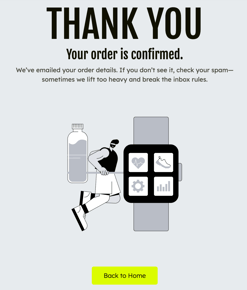
The Thank You module is a clean, conversion-focused confirmation section designed to provide a positive final touchpoint after a user completes an action, such as a membership sign-up or an inquiry.
- Complete Content Control: You have full authority over all messaging within the module. Easily update the primary Heading, the Success Message, and the Supportive Text.
- Customizable Media Section: Anchor your message with a high-quality graphic or image that aligns with your brand's aesthetic. Whether it’s a fitness-themed illustration or a team photo, you have total control over the visual presentation.
- Integrated Call-to-Action (CTA): Includes a prominent "Back to Home" or custom primary button. This ensures that the user's journey doesn't end abruptly and guides them back to your main site or another valuable page.
Trainer Qualifications:
The Trainer Qualifications module is a specialized credentials gallery designed to establish deep authority and trust. By showcasing professional certifications and specific training expertise, this module provides the tangible proof members need to feel confident in their choice of coach.
- Multi-Certification Showcase:
- Credential Images: Upload multiple high-quality images of physical certificates or diplomas to provide visual verification of your expertise.
- Dynamic Gallery: The module organizes these into a clean, grid-based gallery where users can see the breadth of your professional background at a glance.
- Specialization List:
- Highlight specific areas of mastery using a vertical list format.
- Each point is paired with a vibrant, branded star icon to draw attention to your unique skill sets.

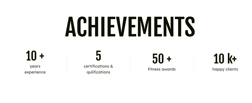
Trainer Achievement:
The Trainer Achievement module is a streamlined, high-impact section designed to showcase the collective success and professional standing of your coaching team. By focusing on pure data and achievements, this module provides immediate social proof, reassuring prospective members that they are learning from highly qualified and experienced experts.
- Dynamic Counter Repeater: Use the flexible repeater field to add multiple achievement metrics across the section. This allows you to scale the module based on how many key performance indicators you wish to highlight.
- Achievement Data Points: For each counter, you can fully customize:
- The Number/Figure: Add specific totals to show significant milestones.
- The Stat Label: Provides clear context for the number, defining exactly what the achievement represents.
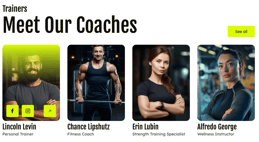
Trainers:
The Trainers module is a sleek, professional directory designed to showcase your coaching staff with high-impact visuals and deep social connectivity. This module provides a clean, organized grid that allows members to get to know their potential coaches before ever stepping into the gym.
- Customizable Trainer Cards : Use the repeater functionality to build a robust gallery of your staff. Each card is a fully customizable profile supporting:
- High-Quality Portraits: Feature professional images of each trainer.
- Name & Expertise: Display the coach's name and their specific designation.
- Interactive Overlay Actions: Every trainer card includes three customizable overlay buttons. You can link these to social media profiles (like Facebook or Instagram) and a primary call-to-action, such as a direct booking link or a full bio.
- Dynamic Grid Layout: Maintain total control over your section's density by changing the number of grid columns. This ensures your team looks great whether you are featuring two coaches or an entire department.
- Card Overlay Color: Fine-tune the look of your cards by changing the overlay color to match your brand's aesthetic.
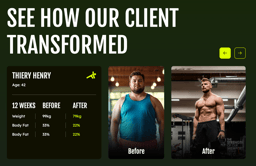
Transformation Slider:
The Transformation Slider is a high-impact storytelling component designed to showcase tangible proof of your brand's effectiveness. By presenting side-by-side "Before and After" visuals paired with detailed physiological data, this module provides an irrefutable narrative of client success that inspires and motivates prospective members.
- Comprehensive Client Data Panel: Each slider item features a dedicated information card where you can detail the specific journey of your clients:
- Personal Details: Display the client's name and age.
- Transformation Metrics Table: Use a customizable table to showcase progress over a specific timeframe. You can list critical stats such as Weight and Body Fat percentage with clear "Before" and "After" comparisons.
- Visual Narrative Media:
- Before & After Imagery: Upload distinct images for the start and end of the client's journey to create a powerful visual contrast.
- Customizable Content: You have full access to modify all text and media within each transformation story.
- Extensive Styling Access:
- Table Color Customization: Adjust the colors of the metrics table to ensure it perfectly aligns with your brand's palette.
- Icon Branding: Change the identifying icons within the information panel to match your desired aesthetic.
- Navigation Styling: Customize the look and feel of the slider buttons for a seamless user experience.
6
Sections
Fitmax Pro provides over 10+ ready-to-use sections—pre-designed content blocks like "Service Cards" "BMI Calculator," or "Meet The Coaches" These high-quality sections are built for maximum impact. Simply select the section you need and drop it anywhere on your page, dramatically accelerating your page design and layout process.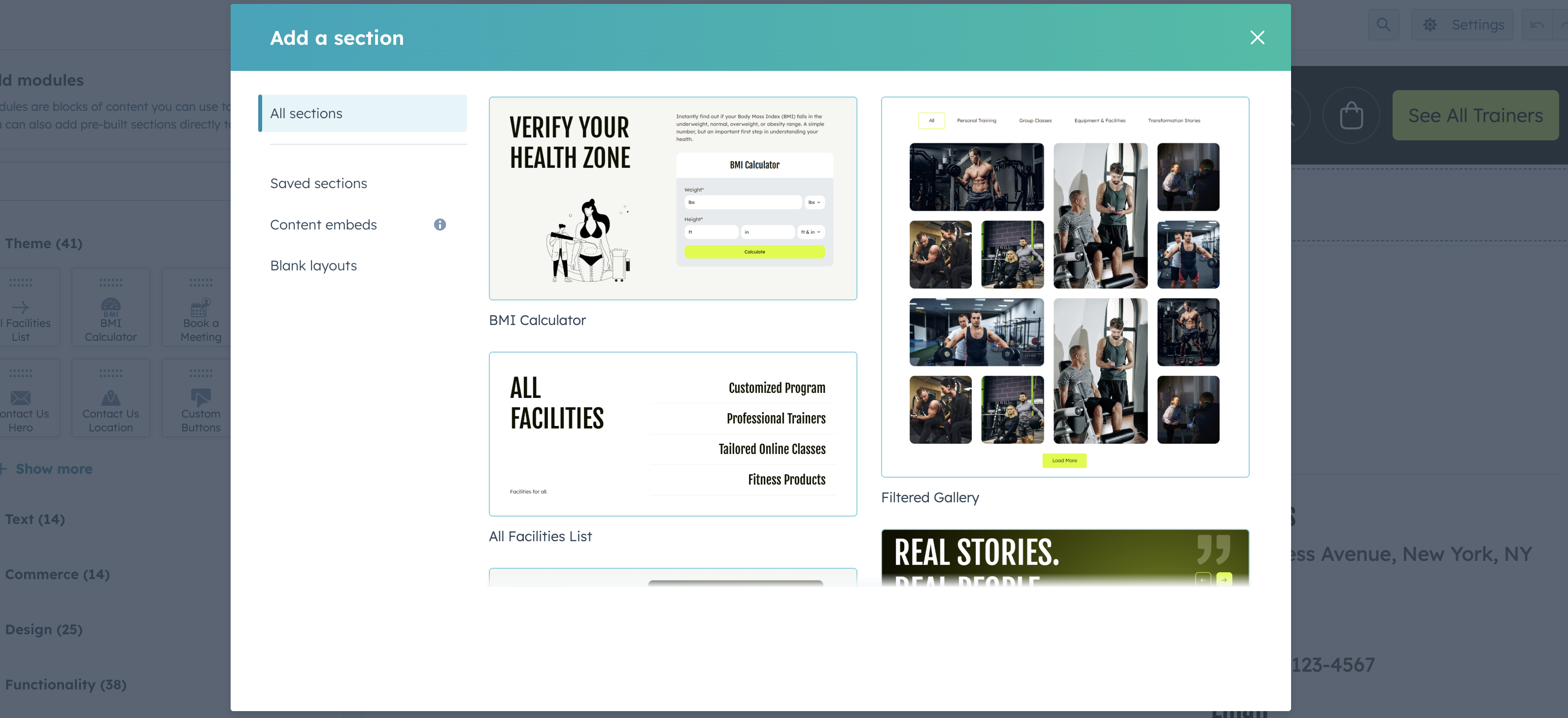
7
Advanced Design & Animation Suite
Every module within the FitMax Pro theme is built with a standardized set of Advanced Edit Options. This gives you granular control over the layout, visual depth, and motion of every section on your page.
1. Layout & Spacing
Section Max-Width:
Adjust the maximum width of any module to create either a contained, professional look or a sprawling, immersive full-width experience.
2. Advanced Background Engine
Every module allows you to define its own backdrop using three distinct types:
Solid Color:
For a clean, high-contrast, and minimalist look.
Gradient:
Create modern, dynamic transitions that add depth to your sections.
Image:
Upload high-resolution fitness photography to set the tone for specific sections.
3. Professional Animation Suite
Bring your website to life and keep users engaged as they scroll with built-in, high-performance animations. Each module features dedicated toggles to enable or disable motion for specific elements:
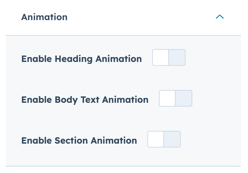
Enable Heading Animation:
Adds entrance effects to your primary titles to grab immediate attention.
Enable Body Text Animation:
Smoothly transitions your descriptions and supporting text into view.
Enable Section Animation:
Animates the entire module container for a cohesive, cinematic feel as the user explores the page.
8
System Templates
Fitmax Pro ensures a cohesive brand experience across all critical HubSpot system pages. We provide pre-designed templates for:
- Error Pages (404 and 500)
- Email Subscription Management (Preferences, Unsubscribe, and Confirmation)
- Membership Functionality (Login and Registration)
- Search Result (with loader)
These templates allow you to apply your theme's branding and styling to every corner of your HubSpot portal, instilling trust and maintaining consistency even during technical or administrative steps.
How to use our system templates:
Integrating the custom system templates from Fitmax Pro is a simple process within your HubSpot settings. Follow these steps to ensure brand consistency across all of your essential system pages:
Navigate to Settings:
In your HubSpot account, click the Settings icon (⚙️) in the top navigation bar.
Find System Pages:
In the left sidebar menu, navigate to Content > Pages.
Go to the System Pages Tab:
At the top of the main content area, select the System Pages tab.
Set Your Templates:
Use the dropdown menu next to each system page type (e.g., 404 Error Page, Subscription Preferences Page, Membership Login Page) and select the corresponding template from the Fitmax Pro theme.
Save Changes:
Click the Save button at the bottom of the page to apply your new branded system templates.
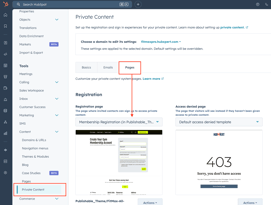
If you need to use membership templates also you will find to update this in private content page settings.
If you need to use membership templates also you will find to update this in private content page settings.
9
Support
For any assistance, kindly contact us at hello@hubxpert.com. Our dedicated team is waiting to provide professional and fast support, ensuring your needs are addressed with the best care and expertise.
About US
As a distinguished HubSpot Platinum Partner Agency, HubXpert excels in CRM design, workflow optimization, comprehensive reports, and the development of effective websites, landing pages, and templates. Our commitment to delivering premium solutions and support has earned accolades from satisfied clients. Discover the breadth of our HubSpot services at hello@hubxpert.com and connect with us for a professional consultation at your convenience.
As a Hubspot Automation Developer at Hubxpert, I specialize in API integration, seamlessly connecting HubSpot with third-party applications. My role encompasses understanding client needs, crafting custom code solutions, and ensuring the smooth operation of our automation workflows. I actively address any HubSpot integration challenges and stay updated with the platform's latest advancements. My dedication ensures clients harness the full potential of HubSpot.

Tanzinul Kabir
Table of Contents:


Subscribe to our newsletter
Easy to use janitorial software to simplify and grow your commercial cleaning business with confidence.
By subscribing you agree to with our privacy policy and provide consent to receive updates from our company.
Want to get more out of HubSpot?
Let’s chat!
Book a quick meeting with us to see how we can help your business grow smarter and faster.

Related
Blogs

HubSpot: Elevating Bangladeshi Consultancies Beyond Excel
Our 2024 Beginner's Guide to Revenue Attribution Models explains key models & helps you choose the right one to optimize campaigns & boost ROI.

Why Bangladeshi Consultancies Lose 30% of Leads—and How to Fix It
Our 2024 Beginner's Guide to Revenue Attribution Models explains key models & helps you choose the right one to optimize campaigns & boost ROI.

Bangladeshi Study-Abroad Marketing: Converting Social Media into Leads
Our 2024 Beginner's Guide to Revenue Attribution Models explains key models & helps you choose the right one to optimize campaigns & boost ROI.

Best CRM for Education Businesses in Bangladesh
Our 2024 Beginner's Guide to Revenue Attribution Models explains key models & helps you choose the right one to optimize campaigns & boost ROI.

Modern Sales Systems That Actually Convert for Bangladeshi Consultancies
Our 2024 Beginner's Guide to Revenue Attribution Models explains key models & helps you choose the right one to optimize campaigns & boost ROI.

What I Learned Helping Healthcare Businesses Fix Their Sales & Marketing Process
Discover how connected CRM systems like HubSpot can transform healthcare sales and marketing processes, improving patient engagement, reducing no-shows, and streamlining workflows.
Related
Blogs
-
HubSpot: Elevating Bangladeshi Consultancies Beyond Excel
Discover how businesses are using HubSpot to streamline marketing efforts, boost lead generation, and drive sustainable growth through data-driven strategies.
-
Why Bangladeshi Consultancies Lose 30% of Leads—and How to Fix It
Discover how businesses are using HubSpot to streamline marketing efforts, boost lead generation, and drive sustainable growth through data-driven strategies.
-
Bangladeshi Study-Abroad Marketing: Converting Social Media into Leads
Discover how businesses are using HubSpot to streamline marketing efforts, boost lead generation, and drive sustainable growth through data-driven strategies.
-
Best CRM for Education Businesses in Bangladesh
Discover how businesses are using HubSpot to streamline marketing efforts, boost lead generation, and drive sustainable growth through data-driven strategies.
-
Modern Sales Systems That Actually Convert for Bangladeshi Consultancies
Discover how businesses are using HubSpot to streamline marketing efforts, boost lead generation, and drive sustainable growth through data-driven strategies.
-
What I Learned Helping Healthcare Businesses Fix Their Sales & Marketing Process
Discover how businesses are using HubSpot to streamline marketing efforts, boost lead generation, and drive sustainable growth through data-driven strategies.