

-1.svg)

-1.svg)
-3.svg)
%201-1.svg)

%202-1.svg)

-1.svg)

%201-1.svg)


%203-1.svg)

%201-1.svg)
-1.svg)

-3.svg)



Setup
After downloading our theme. In your hubspot account set Fitmax as your active theme. You can clone the theme as a child theme so that you can customize the themes and modules.
Theme Customization
Theme Settings allow you to apply widespread design changes to your entire website from one central place.
How to Access Global Theme Settings
To get started with customizing Fitmax, follow these steps:
- In your HubSpot account, click the Settings icon (gear) in the main navigation bar.
- In the left sidebar menu, navigate to Content > Themes & Modules > Themes.
- Hover over the Fitmax theme and click Edit theme.
- You will now see the Global Theme Settings panel on the left side of your screen.
Understanding the Theme Settings
The Fitmax theme settings are broken down into seven main groups to make customizing your site a breeze:
- Brand Colors: Set the primary and secondary colors that define your brand identity. These selections will act as the default palette across your site.
- Background Colors: Establish the default background colors used for various sections and page wrappers to ensure a cohesive look.
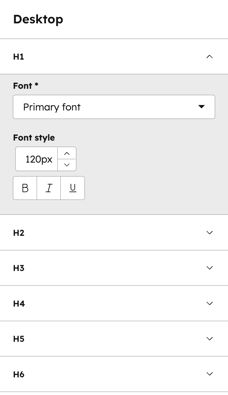
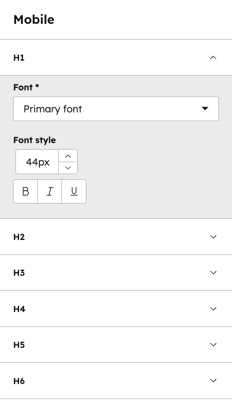
- Typography: Complete control over your text. Here you can set specific font overrides for headings and body copy, including font families, colors, responsive sizes, and line heights.
- Buttons: Complete settings for your calls-to-action. Customize your button colors, fonts, border radiuses, and hover-state styling.
- General view: Key surface settings and default visual behaviors that dictate the overall layout and structural appearance of your website.
- Spacing: Global controls for the default margins and padding used across your website's sections and containers to maintain consistent breathing room.
- Forms: Global color and styling settings for all form inputs, labels, and submit buttons.
Brand colors
In Brand colors, there are two colors option for primary and secondary colors
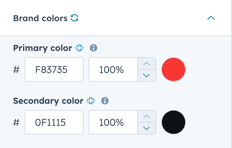
Initially we used #F83735 for primary colors and #0F1115 for secondary colors.
Background colors
We use five different colors and one gradient color for different background colors.
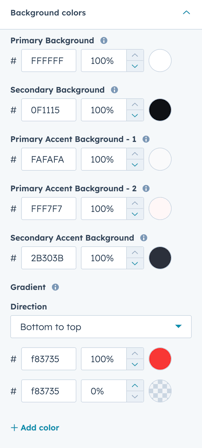
Color codes that we used initially are:
Primary Background ( #FFFFFF)
Secondary Background ( #0F1115)
Primary Accent Background -1 (#FAFAFA)
Primary Accent Background -2 ( #FFF7F7)
Secondary Accent Background ( #2B303B)
Gradient (Bottom to Top #f83735 #f83735)
Typography
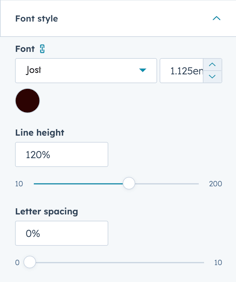
Fitmax gives you full control of your theme typography. Primary Font, Secondary Font, Text colors, Body, Button and Others.
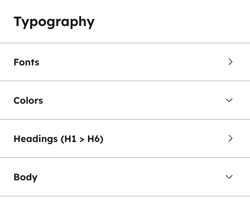
1. Fonts
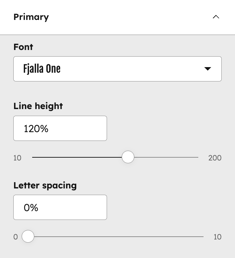
Primary Font :
Here you can control your theme's primary font. We used Fjalla One as the primary font. Mainly, this primary font is used in Title & Header of this theme
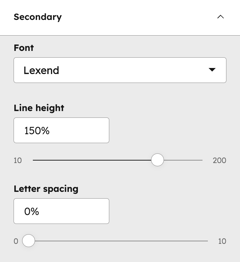
Secondary Font :
You can customize your theme's secondary font from here. We used Lexend as our secondary font. This font is mainly used in this theme body text like paragraphs, articles and others.
2. Colors
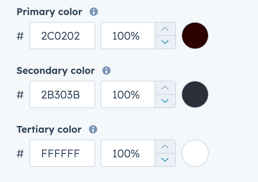
In Colors you will get three text color options.
3. Headings
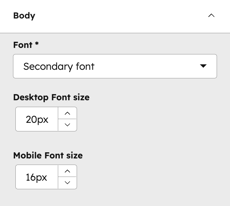
4. Body
Buttons
Fitmax features two core button styles that support extensive customization.By utilizing the built-in style controls, you can adjust typography, background gradients, and corner rounding to achieve a bespoke design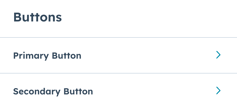
Each button has the following controls: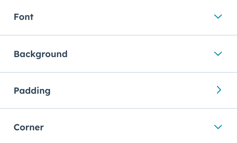
You can customize each button in detail like Colors, Padding, Corner Radius, Hover effect and others.
General View
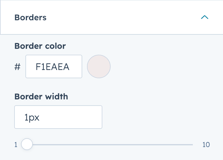
In general view you can adjust the border and corner radius of your theme.
Spacing
Adjust all spacing and content width from the center of the theme. Adjust your desktop padding and also mobile padding.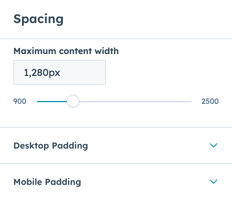
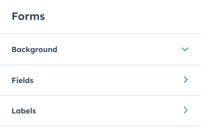
Forms
Fitmax gives you forms design control in a center place. Control your forms background, Fields and others. Also you can customize each in detail.
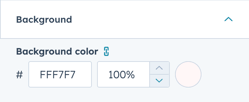
Background color :
You can adjust the background color of your theme forms here. Initially we used #FFF7F7 this color for forms background color.
Fields :
You can adjust the fields of your forms in Fitmax. Adjust your forms fields Font, Background and others.
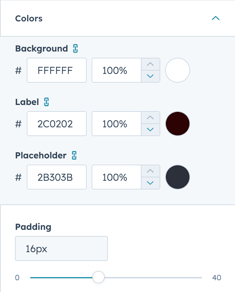
Labels :
You can specifically customize the labels of the form.
Templates
Fitmax has various 13 ready to use templates. Create your site page / landing page with just one click. And also update the controls and styles whenever you want.
Here is the all templates details:
About:
Key Modules Used:
- Hero V2: Creates a high-impact visual introduction to your brand's mission.
- Coaches Gallery Slider : A slider gallery to display your gym trainers.
- Video Gallery Testimonials : A premium social proof component that combines high-energy fitness cinematography with authentic member feedback.
- FAQ: Addresses common inquiries to remove barriers and provide immediate clarity to prospective members.
- Stat Summary: Showcase your gym’s credibility and community growth at a glance.
All Program:
The All Programs template acts as a comprehensive directory for your fitness offerings, providing users with a clear overview of every training path available. By combining a professional showcase with interactive health tools and educational content, this template helps users select the program that best aligns with their personal fitness goals.
Key Modules Used:
- Hero V2: Creates a high-impact visual introduction to your brand's mission.
- Gym Facilities: Provides an interactive interface where users can sort through the class schedule by category (e.g., Yoga, HIIT, Strength) to find the perfect session.
- BMI Calculator: Helps you analyze your BMI throigh an interactive calculator.
- 3 Step Journey: A strategic conversion tool designed to break down complex fitness paths into clear, actionable phases.
- Modern Blog Cards: Integrates the latest educational articles and training tips to provide additional value and context for your programs.
All Trainer:
Key Modules Used:
- Meet The Coaches: Provides a professional directory of your staff, featuring interactive social media links and customizable grid layouts for easy browsing.
- Pricing Comparison : Presents membership tiers in a transparent, side-by-side format to simplify the decision making.
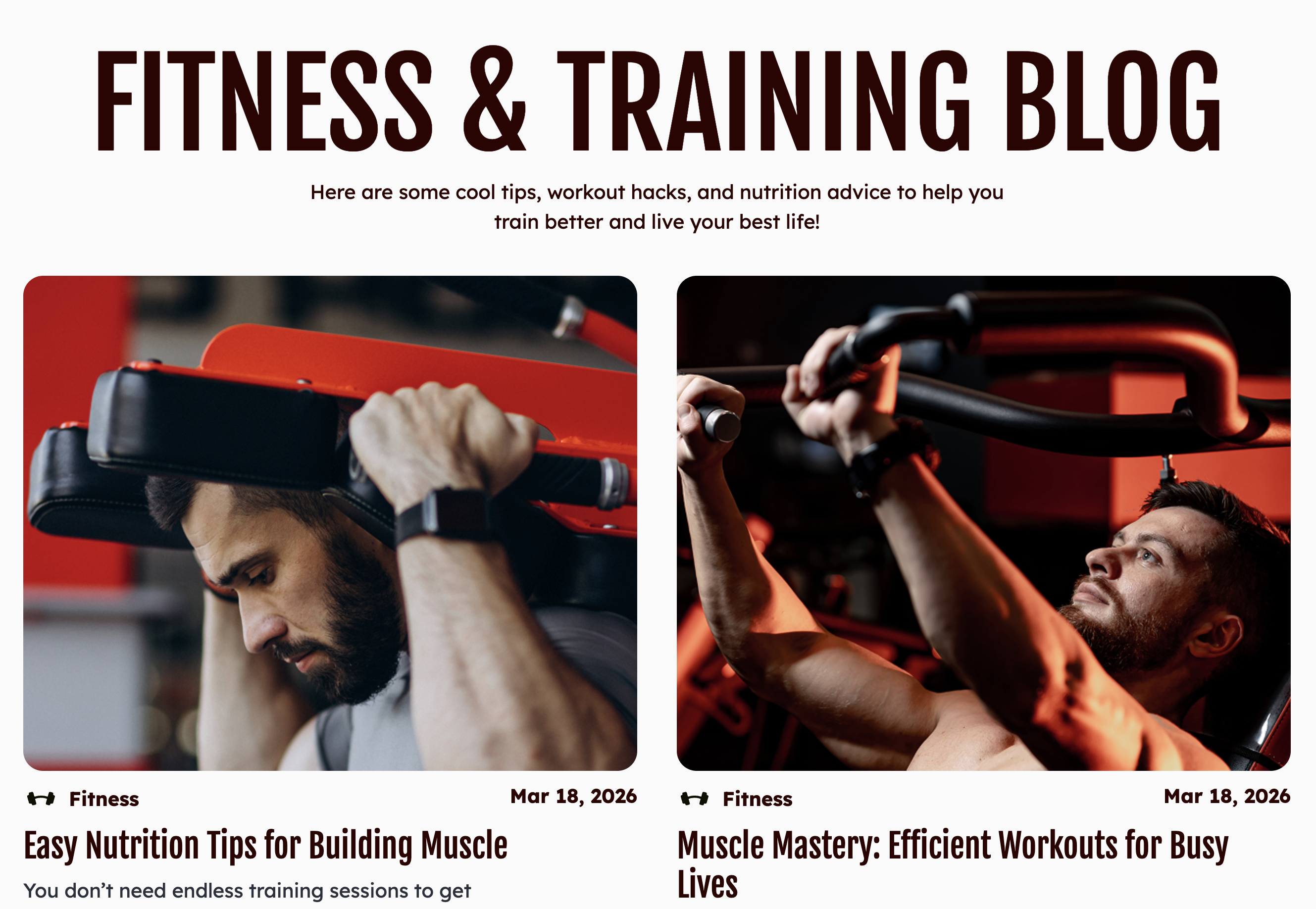
Blog Listing:
The Blog Listing template serves as the central hub for your fitness insights, news, and educational content. Engineered for clean navigation and high readability.
Blog Post:
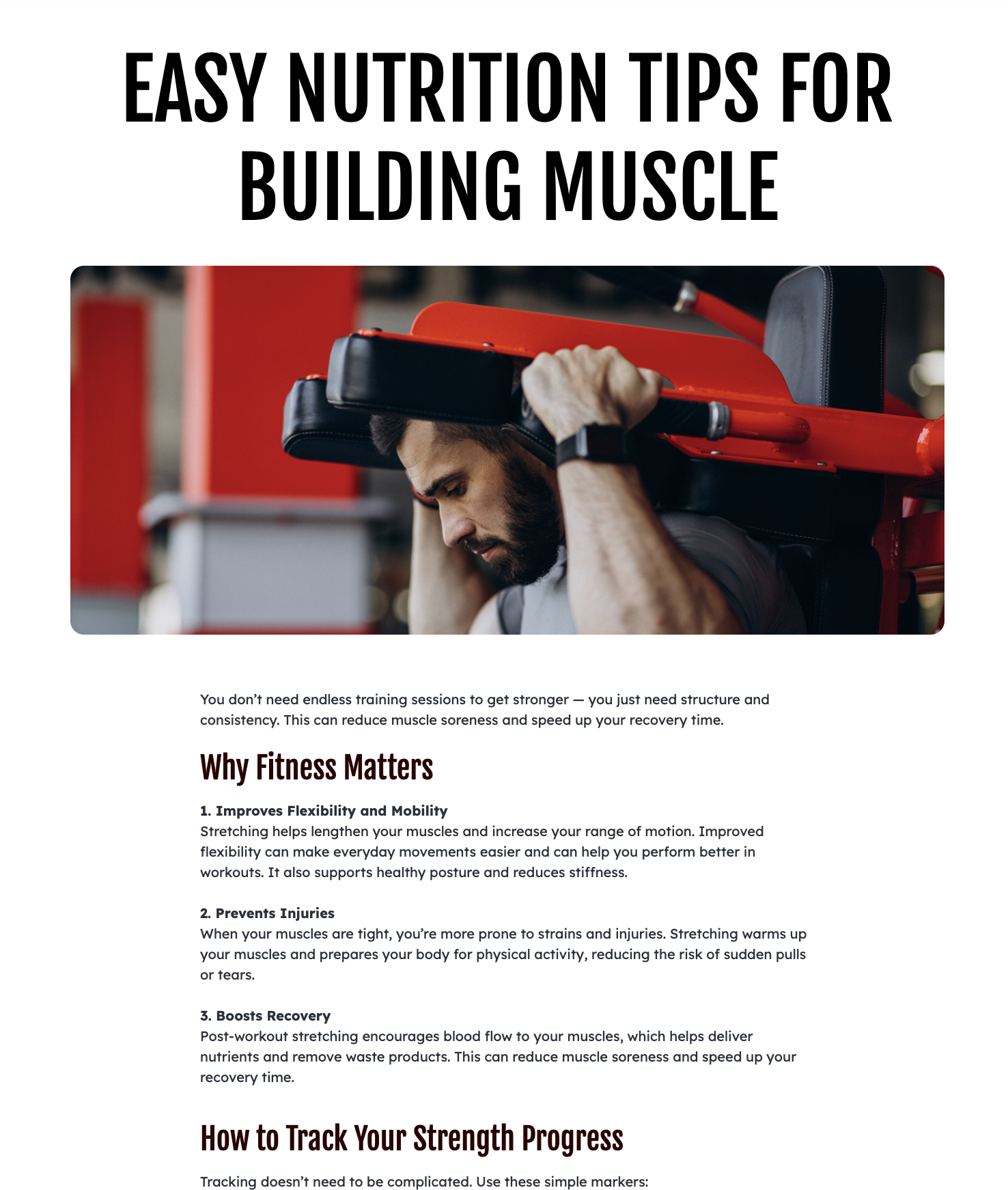
- Modern Blog Cards: Strategically placed at the end of the post to drive further engagement by suggesting related articles or trending fitness topics.
Facilities:
Key Modules Used:
- Home V2: Creates a high-impact visual introduction to your brand's mission.
- Grid Gallery Without Filter: A high-impact visual module designed for curated storytelling.
- Coaches Gallery Slider: A slider gallery to display your gym trainers.
- FAQ: Addresses common inquiries to remove barriers and provide immediate clarity to prospective members.
Gallery:
Key Modules Used:
- Hero V2: Creates a high-impact visual introduction to your brand's mission.
- Grid Gallery Without Filter: A high-impact visual module designed for curated storytelling.
- Coaches Gallery Slider: A slider gallery to display your gym trainers.
- Video Gallery Testimonials: A premium social proof component that combines high-energy fitness cinematography with authentic member feedback.
Home Version 1:
Key Modules Used:
- Hero V2: Creates a high-impact visual introduction to your brand's mission.
- Coaches Gallery Slider: A slider gallery to display your gym trainers.
- BMI Calculator: Helps you analyze your BMI through an interactive calculator.
- Result Impact: A high-conversion authority builder designed to merge emotional storytelling with hard data.
- Modern Blog Cards: Strategically placed at the end of the post to drive further engagement by suggesting related articles or trending fitness topics.
- Marquee: A high-energy, continuous-scrolling banner designed to draw attention to key announcements, values, or membership benefits.
- FAQ: Addresses common inquiries to remove barriers and provide immediate clarity to prospective members.
- Book A Meeting: By integrating HubSpot’s powerful scheduling engine directly into your page, you provide a frictionless way for potential members to book consultations, tours, or personal training sessions
Home Version 2:
The Home Version 2 template focuses on authority and results, making it the ideal choice for performance-oriented fitness brands. By prioritizing coach expertise and data-driven transformation metrics, this layout quickly builds the trust necessary to convert serious athletes and fitness enthusiasts.
Key Modules Used:
- Feature Intro With Video: A high-engagement storytelling block designed to introduce your elite coaching staff or specialized training services.
- Marquee: A high-energy, continuous-scrolling banner designed to draw attention to key announcements, values, or membership benefits.
- Our Trainer: A sleek, categorical navigation tool designed to introduce your diverse coaching staff.
- Featured Partners Spotlights your clients and partners.
- Video Gallery Testimonials : A premium social proof component that combines high-energy fitness cinematography with authentic member feedback.
- Pricing Comparison : Presents membership tiers in a transparent, side-by-side format to simplify the decision making.
- FAQ: Proactively addresses common concerns and logistical questions to streamline the onboarding process for new members.
Individual Class
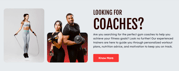
- Professional Profile Hero: Functions as the primary introduction, featuring high-action imagery of the class in progress along with key details like intensity level, duration, and core focus.
- Coaches Gallery Slider: Showcases a rotating lineup of the specific instructors certified to lead this class, allowing users to see the diverse expertise behind the program.
- Our Trainer: Categorizes and introduces the broader coaching team, helping users understand the professional support system available for this specific training path.
- Other Similar Classes: Uses a smart recommendation engine to display related workouts (e.g., suggesting "Power Yoga" if the user is viewing "Pilates"), keeping potential members engaged with your full schedule of offerings.
- FAQ: Addresses common inquiries to remove barriers and provide immediate clarity to prospective members.
- Stat Summary: Showcase your gym’s credibility and community growth at a glance.
Individual Trainer
- Professional Profile Hero: Provides an immediate, high-impact introduction to the trainer, featuring a high-resolution portrait, their specialized title, and a brief overview of their coaching philosophy.
- Icon Featured Grid: Breaks down the trainer's specific areas of mastery—such as Nutrition Planning, Strength Training, or Injury Recovery—using a clean, icon-driven layout that is easy to scan.
- Video Gallery Testimonials: A premium social proof component that combines high-energy fitness cinematography with authentic member feedback.
- Contact Us Hero: A dedicated, action-oriented section at the base of the profile that encourages direct inquiries, allowing potential clients to book a consultation or ask questions immediately.
Global Modules
Header
The Navbar is the foundational navigation component of the FitMax theme, offering two distinct levels of complexity to suit your site’s architecture. This module provides total control over your global header and user journey.
Navbar Modes
- Simple Navbar:
- HubSpot Menu Integration: Quickly populate your navigation by selecting an existing menu directly from your HubSpot settings.
- Ease of Use: Ideal for sites with straightforward page structures.
- Advanced Navbar (Mega Menu):
Create multiple nav items and add links to the items.

Visual Styling & Backgrounds
- Background Type Options: Define the aesthetic foundation of your header with distinct background types:
- Solid Color: Provides a clean, high-contrast block for maximum legibility.
- Solid Color: Provides a clean, high-contrast block for maximum legibility.
Core Customization Features
- Brand Identity: Easily upload and customize your Logo, including a dedicated link to your homepage.
- Global Utilities:
- Call-to-Action (CTA): Features a high-visibility primary CTA button to drive immediate conversions.

Footer
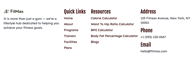
The Footer serves as the comprehensive anchor for your website, providing essential navigation, contact information, and lead generation opportunities. Designed with a clean, multi-column layout, it ensures that visitors always have a clear path to deeper content or direct support as they reach the end of any page.
- Brand Identity & Messaging:
- Customizable Logo: Reinforce your brand by uploading your primary logo.
- Subtext/Bio Section: Include a brief mission statement or "About Us" subtitle to remind users of your gym’s core values.
- Flexible Multi-Navigation:
- Multiple Menu Columns: Organize your site links into distinct categories such as "Quick Links" and "Resources".
- Scalable Links: Use the navigation section to add multiple menus, making it easy for users to find specialized content like calculators, meal plans, or class schedules.
- Comprehensive Location Section:
- Direct Contact Info: Clearly list your physical Address, Phone number, and official Email for professional accessibility.
- Authority Building: Presenting clear contact details at the bottom of every page reinforces trust and professional transparency.
Modules
Fitmax equips you with a robust library of more than 30+ interactive, reusable modules. These are the building blocks you need to create diverse pages across any category—from high-conversion landing pages to detailed service pages. This extensive collection allows you to assemble unique designs quickly, reducing development time and maximizing your creative flexibility.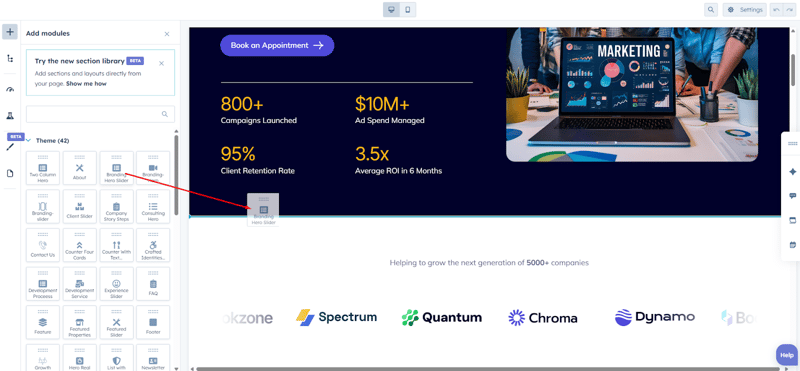
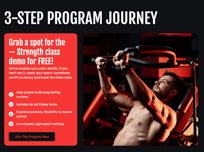
3 Step Journey
The 3 Steps Journey module is a versatile, high-impact component designed to guide users through a specific process, offer, or value proposition.
Fully Customizable Content: You have complete control over the text. Use the rich text options to define your headings, subtext, and messaging to match your brand's voice.
- Flexible Feature Lists: The "This is your move" section can be enabled or disabled based on your needs. For maximum layout flexibility, this list can be overlaid on the Media Section (Image) or positioned over the Content Card (Green Section).
- Custom Media: Upload any image that represents your brand or service to fill the right-hand media container.
- Multi-Action Buttons: Drive conversions by adding up to 5 custom buttons. Each button can be styled and linked independently to different pages or resources.
BMI Calculator:
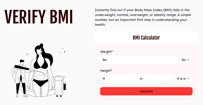
The BMI Calculator is a high-utility engagement tool that provides immediate value to your visitors. By allowing users to calculate their Body Mass Index directly on your site, you establish your brand as a helpful authority in their fitness journey. This module is built with the same precision and ease-of-use as our other popular calculators available on the HubSpot Marketplace.
- Dual Metric Support: The calculator is globally accessible, supporting both Imperial (lbs/ft/in) and Metric (kg/cm) systems. Users can toggle between these units to ensure accurate data entry.
- Dynamic Result Pop-ups: To make the experience more visual and informative, you can enable pop-up images that trigger based on the user's result. Different images can be set for each category: Underweight, Normal, Overweight, and Obesity.
- Total Content Control: Every piece of text—from the "Verify BMI" title and descriptive paragraphs down to the field labels and button text—is fully editable within the HubSpot page editor.
Calorie Calculator
Waist To Hip Ratio Calculator
Body Fat Percentage Calculator
Book a Meeting:
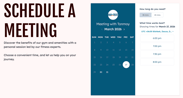
The Book a Meeting module is designed to bridge the gap between interest and action. By integrating HubSpot’s powerful scheduling engine directly into your page, you provide a frictionless way for potential members to book consultations, tours, or personal training sessions in real-time.
- Native HubSpot Integration: Seamlessly connect your existing HubSpot meeting links. Once linked, the module automatically pulls in your availability calendar, allowing users to book sessions without ever leaving your site.
- Flexible Layout Controls: Choose how your booking interface sits on the page. You can adjust the container width to ensure the calendar perfectly complements your surrounding content.
- Customizable Content & Typography: You have full control over the "Schedule a Meeting" header and the descriptive subtext. Use the rich text editor to explain the benefits of a personal session or to provide specific instructions to the user.
- Design & Background Customization: Tailor the module’s visual impact with extensive design options. You can modify background colors, spacing, and styling to match your brand's specific color palette and aesthetic.
Button:
The Buttons module is the primary interaction tool for the FitMax theme. Designed for high visibility and consistent branding, this module allows you to create a sequence of call-to-action points that guide users through your site’s conversion funnel.
- Repeater Field Functionality: Efficiently manage multiple buttons within a single section. The repeater field allows you to add, remove, and reorder buttons quickly to create horizontal or vertical button groups.
- Dual Style Variations: Switch between Primary and Secondary button variants to establish visual hierarchy on your page.
- Flexible Layout Modes:
- Text & Icon: The standard CTA with a descriptive label and supporting icon.
- Icon Only: Perfect for minimalist designs or social media links where only a graphical representation is needed.
- Full Design Customization: Each variation comes with a comprehensive suite of styling controls:
- Typography: Choose your font family, size, and weight.
- Colors & Hover Effects: Define specific colors for text, icons, and backgrounds for both the static and hover states.
- Spacing & Borders: Fine-tune the button's presence with adjustable padding and border settings.
- Integrated Icon Library: Add and customize icons to provide visual cues that increase click-through rates.

Contact Us Hero:
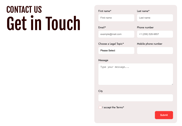
The Contact Us Hero module serves as the primary gateway for member inquiries and lead generation. By combining a clean, professional aesthetic with a high-conversion form layout, this module ensures that getting in touch is a seamless experience for your visitors.
- Integrated Form Placement: Easily embed any HubSpot form into the module. The layout is optimized to handle various field types—including text inputs, dropdowns, and message boxes—while maintaining a structured, balanced look.
- Flexible Container Settings: Tailor the module to your specific page design by adjusting the Container Max Width. This allows the form and text to sit comfortably whether you prefer a full-width immersive look or a more centered, compact feel.
- Background Personalization: Change the background settings to match your site’s theme. Whether you want a solid brand color or a subtle texture, the customization options allow the form to pop against its backdrop.
- Responsive Layout: The two-column design automatically reflows for mobile devices, ensuring your "Get in Touch" section remains accessible and easy to use on any screen size.
Coaches Gallery Slider
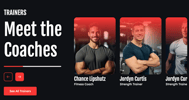
The Coaches Gallery Slider provides a high-impact way to introduce your team of experts. By combining a smooth sliding interface with interactive hover effects, this module allows visitors to get to know your trainers’ personalities and specialties at a glance.
- Dynamic Trainer Cards (Repeater): Effortlessly build your gallery by adding multiple trainer profiles using the repeater field. This allows for a clean, organized display of your entire coaching staff.
- Interactive Media Controls:
- Hover Image Effect: Engage users with a dynamic "reveal" by setting a different image to appear when a user hovers over a trainer's card.
- Overlay Buttons: Add direct call-to-action buttons (like "View Bio" or "Book Session") that overlay directly on the trainer's image for a sleek, modern look.
- Detailed Trainer Profiles: Each card includes dedicated space for a Title (Trainer Name), Designation, and a full Description field to highlight their certifications, experience, or philosophy.
- Customizable Navigation & Branding:
- Slider Buttons: Full control over the navigation buttons, including background color, icon selection, and icon color.
- Visual Indicators: Match the module to your brand identity by customizing the Progress Bar color at the bottom of the slider.
- "See All" CTA: Includes a primary action button at the bottom of the content section to redirect users to a full team
directory page.
FAQ:
The FAQ module is a high-utility, multipurpose component designed to address member concerns while improving your site's SEO. It offers a structured way to present information, whether you are providing a simple list of questions or a deep-dive knowledge base categorized by topic.
- Fully Searchable Content: All questions and descriptions are indexed, making it easier for users to find answers and for search engines to crawl your site.
- Rich Text Descriptions: Use the HubSpot rich text editor for each FAQ answer to include links, bold text, or lists.
- Accordion Interaction: Uses a smooth, space-saving accordion effect that allows users to expand only the answers they are interested in.

Feature Intro with Video
The Feature Intro With Video module is a high-impact storytelling component designed to introduce key services, special offers, or your gym's unique philosophy. By pairing bold text with immersive media, it captures the visitor's attention and provides a clear path to the next step in their fitness journey.
- Flexible Media Section: Customize the visual focus of your introduction by choosing between a High-Definition Video or a Compelling Image. This allows you to either showcase the high-energy atmosphere of your gym through motion or use a high-quality still to emphasize a specific result.
- Fully Editable Content: The content section is built for maximum readability and brand alignment. You can easily update the heading, subtext, and body copy using the rich text editor to ensure your value proposition is perfectly communicated.
- Action-Oriented Button: Includes a dedicated primary button to drive conversions. You can customize the label, link, and styling to match your theme’s aesthetic.
- Immersive Layout: The module features a balanced, split-screen design that keeps your messaging and media side-by-side, ensuring that mobile and desktop users alike get a premium, cohesive experience.
Featured Partners:
- Dynamic Logo Repeater: Effortlessly add, remove, or reorder partner logos using a user-friendly repeater field. This allows you to scale your partner list as your professional network grows.
- Layered Background Controls:
- Module Background: Customize the outer section’s background to blend seamlessly with your page design.
- Card Background: Adjust the styling of the inner container (the card) to make the logos pop or to create a high-contrast visual focus.
- Clean Grid Layout: The module automatically organizes logos into a balanced, easy-to-read grid that looks great on both desktop and mobile devices.

Grid Gallery Without Filter
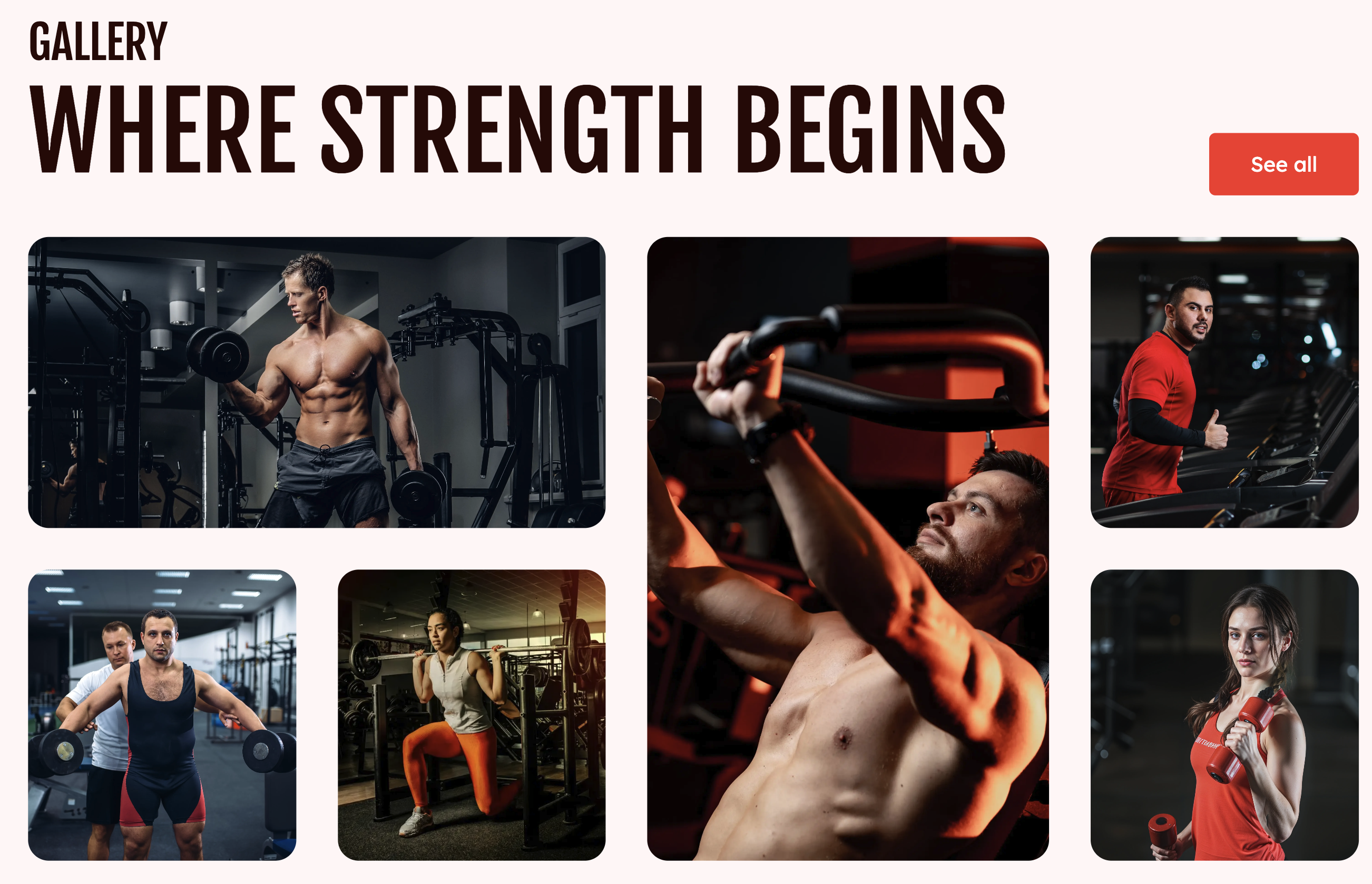
The Grid Gallery Without Filter is a clean, streamlined visual component designed for direct impact. Unlike our dynamic filterable version, this module focuses on displaying high-quality imagery in a fixed, curated arrangement, making it perfect for dedicated facility tours or focused transformation showcases.
- Simplified Block Structure: Organise your visuals by creating multiple Gallery Blocks. Each block acts as a standalone set of images, allowing you to group related content without the need for complex navigation.
- Adaptive Image Grid: * Add up to 7 images per block.
- The module features an intelligent grid system that automatically adjusts its layout based on the number of images you upload, ensuring a professional and balanced design regardless of the card count.
- High-Impact Visuals: Every image is housed in a modern, rounded-corner container that maintains aesthetic consistency across your site.
- Global Call-to-Action: Includes a prominent primary button (e.g., "See All Trainers") at the top right, allowing you to easily redirect users to more detailed pages or booking forms.
- Customizable Typography: Easily edit the section Label (e.g., "GALLERY") and the main Headline (e.g., "WHERE STRENGTH BEGINS") to provide context for your visual story.
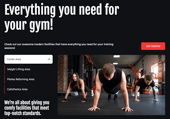
Gym Facilities
The Gym Facilities module is a high-visibility content section designed to give prospective members a detailed look at your training environment. By combining categorized facility lists with immersive media, this module effectively showcases the quality and variety of your gym's equipment and specialized zones.
Key Features
- Facility Categorization: Effortlessly organize your space by enlisting multiple gym areas. Users can toggle between these areas to see specific details for each.
- Integrated Media Gallery: Inside each listed area, you can add high-quality images that showcase that specific part of your facility. This provides a visual tour that helps build confidence in your gym's standards.
- Conversion-Ready CTA: Includes a prominent "Get Started" call-to-action button, allowing you to drive membership sign-ups or tour bookings directly from the facilities overview.
- Sleek Navigation: Features a modern, interactive list with arrow indicators, making it intuitive for users to browse through everything your facility has to offer.
Hero - V2
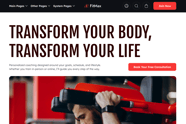
- The Hero - V2 is a sophisticated, high-impact header designed to deliver a clear and compelling first impression. This version of our hero module provides ultimate flexibility in storytelling, allowing you to showcase your facility or programs through diverse media formats and a customizable layout that perfectly fits your page’s narrative flow.
Key Features - Versatile Media Support: Choose the best way to visually represent your brand. This module allows you to easily toggle between a high-resolution Image, a natively hosted Video, or an Embedded video (such as YouTube or Vimeo) to create an immersive experience.
- Fully Customizable Rich Text: You have complete control over the messaging. Use the integrated rich text field to define your headings (e.g., "YOUR FITNESS STARS HERE") and descriptive copy with full support for custom formatting.
- Adjustable Layout Direction: Tailor the visual hierarchy of your page by switching the layout direction. You can choose to position your content on the left or right to alternate the flow and keep visitors engaged as they browse your site.
Icon Featured Grid
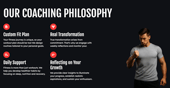
The Icon Featured Grid module is a highly flexible content section designed to outline your services, core values, or coaching philosophies. By combining a clean icon-based layout with high-impact character imagery, this module effectively breaks down complex information into digestible, visual "feature bites" that resonate with your audience.
- Dynamic Media Controls: * Customize the visual focus by adding a high-quality cutout or image of a trainer or athlete to the right side of the section.
- Visibility Toggle: For a more minimalist, full-width grid approach, you can easily toggle this media section off.
- Flexible Feature Repeater: Build your grid exactly how you need it. Use the repeater field to add multiple cards, each highlighting a specific program or benefit.
- Versatile Icon Library: For every grid item, you have the option to choose between three different icon formats to best match your branding:
- HubSpot Icon: Select from the built-in library for quick, standard styling.
- Custom SVG: Upload your own vector graphics for a unique, modern look.
- Image: Use a specific PNG or JPG if a graphical icon is required.
- Rich Text Integration: Each card in the grid features a bold title and a detailed description area, allowing you to explain the "why" behind your featured workout programs or coaching methods.
- Global Branding: Easily update the main section heading (e.g., "OUR COACHING PHILOSOPHY") to ensure the module aligns with the rest of your page content.
Marquee:
- Customizable Content (Repeater): Effortlessly add multiple items to your scrolling banner. For each item, you can:
- Change the Icon: Select the perfect visual cue to match your message.
- Edit the Text: Use the text field to write concise, punchy phrases that resonate with your audience.
- Variable Animation Speed: Take control of the module's energy by adjusting the scrolling speed. Whether you want a slow, sophisticated glide or a fast-paced, high-energy scroll, the speed is entirely in your hands.
- Interactive "Pause on Hover": Improve readability and user engagement with a dedicated toggle that allows the animation to pause when a user hovers over the text.
- Background Color: Modify the banner's background color to make it stand out against other page sections.
Icon & Text Color: Fine-tune the color of your icons and typography to ensure maximum contrast and brand consistency.
- Seamless Loop: The marquee is engineered to loop indefinitely, providing a smooth, uninterrupted visual experience for every visitor.

Meet The Coaches:
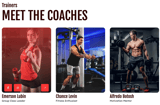
- Coach Cards: You can add multiple individual coach cards.
- Rich Profile Details: Each card is a complete mini-profile, supporting:
-High-Quality Imagery: Upload a professional portrait of the coach.
-Coach Title & Designation: Clearly display their name and their specific area of expertise.
- Flexible Grid Layouts: Under the Layout and Alignment settings, you can choose the density of your gallery by selecting between 2, 3, or 4 columns. This ensures your team page looks balanced, whether you have three coaches or thirty.
- Interactive Card Overlays: * Drive deeper engagement with customizable overlay buttons.
- Each button can be easily linked to a coach’s full bio, social media profiles, or a direct booking link.
Modern Blog Cards:
- Dynamic Blog Fetching: Simply select your desired blog type, and the module will automatically retrieve and display the two most recent articles. This keeps your home or landing pages current with minimal effort.
- Automated Metadata Display: Each card automatically pulls in essential post information, including the Category (e.g., "Active Lifestyle"), the Publish Date, and the Featured Image.
- Customizable Visual Overlays: Maintain perfect brand consistency by adjusting the overlay colors on the blog cards. This ensures that post titles remain sharp and legible regardless of the featured image used.
- Direct Navigation: Includes a prominent "See All Blogs" call-to-action button, making it easy for users to dive deeper into your full library of content.
- Granular Styling & Animation Controls: Take full control of the module's aesthetics by customizing the font colors for every text element. Plus, you can bring the section to life using built-in toggles to Enable Heading Animation, Enable Body Text Animation, and Enable Section Animation.
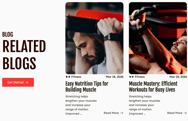
Other Similar Classes
The Other Similar Classes module is a strategic cross-promotion tool designed to keep users exploring your fitness programs. By showcasing related or alternative sessions, you can guide visitors toward new workout interests and increase their overall engagement with your facility's offerings.
- Flexible Class Cards: Effortlessly create grid of alternative classes. Each card is a fully independent entry, allowing for a unique image, Class Title, and Category Label to be set for every item.
- Fully Interactive Cards: Every card is entirely clickable, allowing you to link users directly to specific class booking pages, detailed descriptions, or registration forms.
- Customizable Overlay Badges: * Add specific status or difficulty badges to each card to provide immediate context.
- Visual Precision: You have full control over the overlay colors, you have granular control over the Badge Background Color and the Badge Icon Color to ensure they stand out against your chosen imagery.
- Variable Grid Layout: Tailor the presentation to your page's density by selecting the number of columns, with support for max 4 cards per row.
- Global Action Button: Includes a prominent "See All Trainers" or "View All Classes" primary button in the header section to provide a clear exit path for users wanting to see your full schedule.
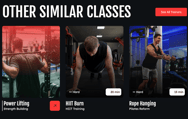
Our Trainer
The Our Trainer module is a streamlined gallery designed to introduce your professional coaching staff to prospective members. By providing a clean, focused display of your trainers' expertise and backgrounds, this module helps build the personal connection necessary to turn website visitors into motivated clients.
Key Features
- Professional Trainer Cards (Repeater): Use the repeater field to build a comprehensive roster of your staff. This organized layout allows each trainer to have their own dedicated space without cluttering the page.
- Customizable Content: Each individual card supports a high-quality portrait image, a bold Title (Trainer Name), and a detailed Description area to highlight their specific certifications, training styles, or success stories.
- Direct Call-to-Action: Every card can be assigned its own Card Link, allowing you to redirect users to a detailed personal bio page, a social media profile, or a direct booking calendar.
- Balanced Grid Layout: The module is designed to present trainers in a clear, symmetrical customizable grid from the style section that adapts to provide a premium viewing experience on both desktop and mobile devices.
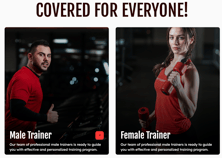
Pricing Comparison:
The Pricing Comparison module is a strategic conversion tool designed to present your membership options in a clear, high-contrast grid. By organizing plans into distinct categories and highlighting key features, this module helps prospective members quickly identify the best value for their fitness goals.
-
Plan Categorization: Effortlessly organize your offerings into multiple categories using a primary filter. This allows users to toggle between different sets of plans, keeping the interface clean and focused.
-
Dynamic Pricing Cards: Use the repeater field to create multiple pricing cards per plan.
-
Transparent Pricing: Display monthly rates and prominent discount badges to incentivize sign-ups.
-
Individual Call-to-Action: Every card features its own dedicated "Get Started" button, allowing you to link directly to different checkout pages or registration forms for each specific tier.
-
Customizable Layout: Every section is fully editable to match your brand's voice and aesthetic.
-
Precision Styling: Adjust the max-width of the cards and fine-tune internal padding from the style section to ensure the grid looks perfect on all screen sizes.
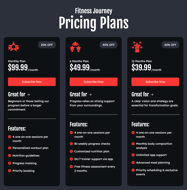
Professional Profile Hero
The Professional Profile Hero is a versatile introductory module designed to showcase a specific trainer, program, or core philosophy. It combines high-impact media with clear, persuasive messaging to drive user engagement from the very top of the page.
-
Versatile Formats: Effortlessly switch between a high-resolution Image, a natively hosted Video, or an Embedded video (such as YouTube) to capture your audience's attention.
-
Use the Layout Direction settings to reverse the alignment of your content.
-
Position your media on the right and text on the left, or vice versa, to alternate the visual flow across different pages of your site.

Result-Impact
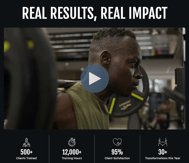
The Result Impact module is a high-performance section designed to validate your brand's efficacy through a combination of immersive media and hard data. By pairing a central cinematic element with rapid-fire statistics, this module builds immediate trust and demonstrates the "Real Results" your facility delivers to its members.
- Versatile Media Center: Choose the most impactful way to showcase your results by selecting between a Static Image, a Hosted Video, or an Embedded Video (such as YouTube).
- Immersive Experience: The media section is designed to anchor the top of the module, providing a powerful visual narrative before users dive into the specific data points.
- Dynamic Counter Stats (Repeater):
- Multi-Stat Support: Use the repeater field to enlist multiple achievement metrics to showcase the scale of your impact.
- Custom Icon/Image: Add a visual cue to represent the category.
- Numerical Value: Feature your specific growth or success numbers.
- Descriptive Text: Provide a short label to give the data context.
Stat Summary
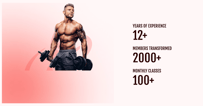
The Stat Summary module is a streamlined, data-focused component designed to emphasize your brand's growth and authority at a glance.
-
Dynamic Performance Metrics: Highlight your gym's key achievements using a clear, vertical list of statistics. You can easily customize labels and values through Rich Text Field
-
Customizable Media Section: Anchor your data with a high-impact cutout image of an athlete or trainer against a subtle, branded background glow to maintain a premium look.
-
Column Reverse: Switch the orientation of the text and imagery using the column reverse toggle in the layout settings to better fit your page flow.
-
Alignment Options: Precisely control the content alignment to ensure your messaging is perfectly positioned.
-
Responsive Height Styling: Maintain visual consistency across all devices with independent controls to change the module height specifically for mobile and desktop views.
Thank You:
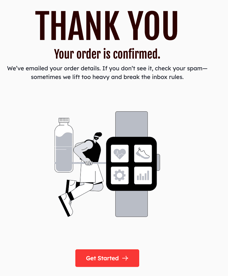
- Complete Content Control: You have full authority over all messaging within the module. Easily update the primary Heading, the Success Message, and the Supportive Text.
- Customizable Media Section: Anchor your message with a high-quality graphic or image that aligns with your brand's aesthetic. Whether it’s a fitness-themed illustration or a team photo, you have total control over the visual presentation.
- Integrated Call-to-Action (CTA): Includes a prominent "Back to Home" or custom primary button. This ensures that the user's journey doesn't end abruptly and guides them back to your main site or another valuable page.
Video Gallery Testimonials
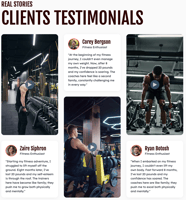
The Video Gallery Testimonials module is a high-engagement storytelling tool designed to showcase client success through immersive video content. By combining professional video evidence with personal narratives, this module creates a powerful, multi-dimensional testimonial experience that resonates with prospective members.
- Flexible Video Media: Choose the most impactful format for your stories by selecting between natively hosted Video or an Embedded video link (such as YouTube).
- Aspect Ratio Control: Tailor the visual presentation of each video by adjusting the aspect ratio to perfectly suit your page layout and media source.
- Detailed Author Profiles: Every testimonial card is a complete narrative unit:
- Custom Avatar: Upload a personal image of the client to humanize the story.
- Author Information: Clearly display the client's name and designation.
- Personal Testimonial Text: Include a rich text field for detailed written feedback and success stories.
Sections
Fitmax provides over 10+ ready-to-use sections—pre-designed content blocks like "Service Cards" "BMI Calculator," or "Meet The Coaches" These high-quality sections are built for maximum impact. Simply select the section you need and drop it anywhere on your page, dramatically accelerating your page design and layout process.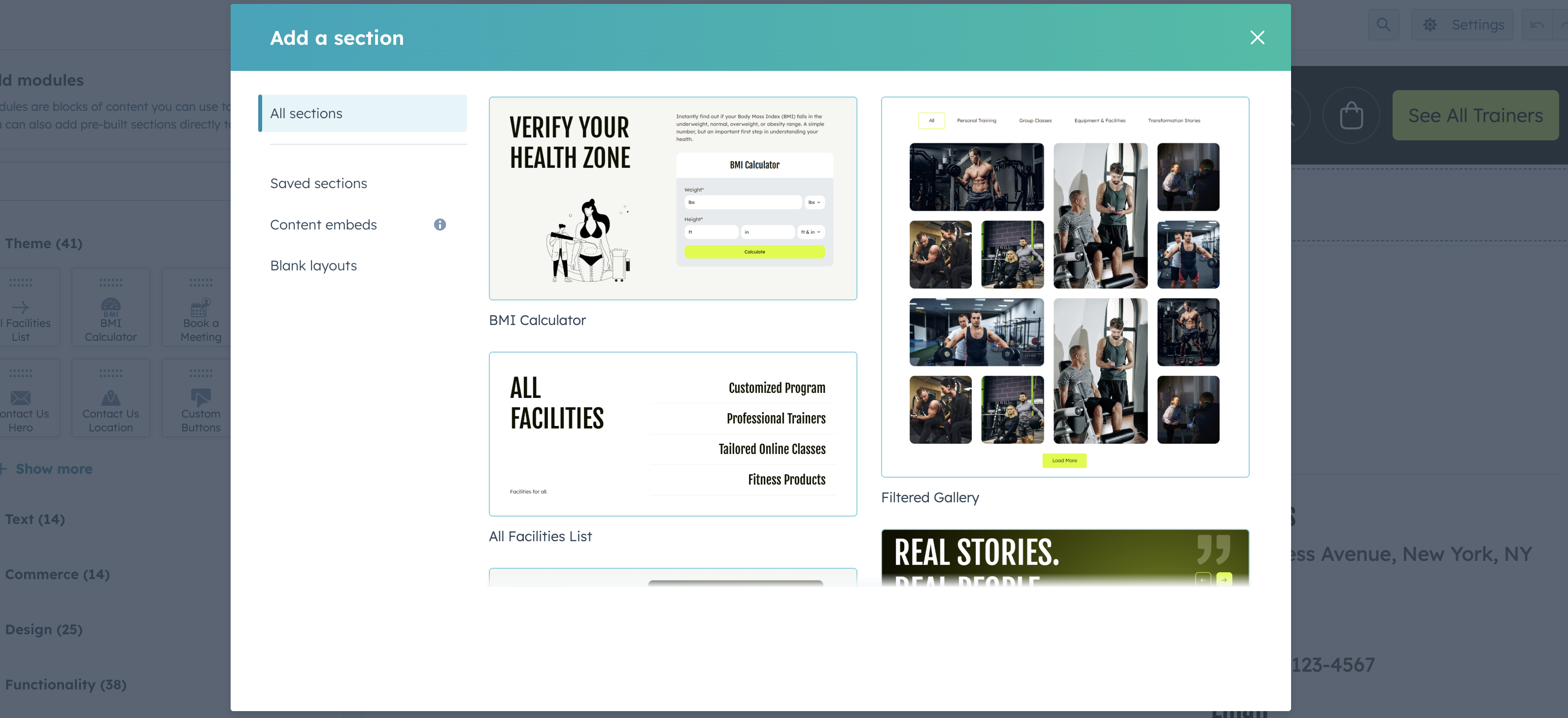
System Templates
Fitmax ensures a cohesive brand experience across all critical HubSpot system pages. We provide pre-designed templates for:
- Error Pages (404 and 500)
- Email Subscription Management (Preferences, Unsubscribe, and Confirmation)
- Membership Functionality (Login and Registration)
- Search Result (with loader)
These templates allow you to apply your theme's branding and styling to every corner of your HubSpot portal, instilling trust and maintaining consistency even during technical or administrative steps.
How to use our system templates:
Integrating the custom system templates from Fitmax is a simple process within your HubSpot settings. Follow these steps to ensure brand consistency across all of your essential system pages:
Navigate to Settings:
Find System Pages:
Go to the System Pages Tab:
Set Your Templates:
Save Changes:
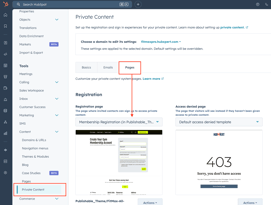
If you need to use membership templates also you will find to update this in private content page settings.
Support
About US
As a Hubspot Automation Developer at Hubxpert, I specialize in API integration, seamlessly connecting HubSpot with third-party applications. My role encompasses understanding client needs, crafting custom code solutions, and ensuring the smooth operation of our automation workflows. I actively address any HubSpot integration challenges and stay updated with the platform's latest advancements. My dedication ensures clients harness the full potential of HubSpot.

Tanzinul Kabir
Table of Contents:


Subscribe to our newsletter


HubSpot: Elevating Bangladeshi Consultancies Beyond Excel
Our 2024 Beginner's Guide to Revenue Attribution Models explains key models & helps you choose the right one to optimize campaigns & boost ROI.

Why Bangladeshi Consultancies Lose 30% of Leads—and How to Fix It
Our 2024 Beginner's Guide to Revenue Attribution Models explains key models & helps you choose the right one to optimize campaigns & boost ROI.

Bangladeshi Study-Abroad Marketing: Converting Social Media into Leads
Our 2024 Beginner's Guide to Revenue Attribution Models explains key models & helps you choose the right one to optimize campaigns & boost ROI.

Best CRM for Education Businesses in Bangladesh
Our 2024 Beginner's Guide to Revenue Attribution Models explains key models & helps you choose the right one to optimize campaigns & boost ROI.

Modern Sales Systems That Actually Convert for Bangladeshi Consultancies
Our 2024 Beginner's Guide to Revenue Attribution Models explains key models & helps you choose the right one to optimize campaigns & boost ROI.

What I Learned Helping Healthcare Businesses Fix Their Sales & Marketing Process
Discover how connected CRM systems like HubSpot can transform healthcare sales and marketing processes, improving patient engagement, reducing no-shows, and streamlining workflows.
-
HubSpot: Elevating Bangladeshi Consultancies Beyond Excel
Discover how businesses are using HubSpot to streamline marketing efforts, boost lead generation, and drive sustainable growth through data-driven strategies.
-
Why Bangladeshi Consultancies Lose 30% of Leads—and How to Fix It
Discover how businesses are using HubSpot to streamline marketing efforts, boost lead generation, and drive sustainable growth through data-driven strategies.
-
Bangladeshi Study-Abroad Marketing: Converting Social Media into Leads
Discover how businesses are using HubSpot to streamline marketing efforts, boost lead generation, and drive sustainable growth through data-driven strategies.
-
Best CRM for Education Businesses in Bangladesh
Discover how businesses are using HubSpot to streamline marketing efforts, boost lead generation, and drive sustainable growth through data-driven strategies.
-
Modern Sales Systems That Actually Convert for Bangladeshi Consultancies
Discover how businesses are using HubSpot to streamline marketing efforts, boost lead generation, and drive sustainable growth through data-driven strategies.
-
What I Learned Helping Healthcare Businesses Fix Their Sales & Marketing Process
Discover how businesses are using HubSpot to streamline marketing efforts, boost lead generation, and drive sustainable growth through data-driven strategies.